
Workee vs GlossGenius:
charting is theirs, the calendar is the question
GlossGenius runs two plan families: beauty and wellness from $28/mo ($24 billed annually), and a medspa line at $168/mo ($148 billed annually) and $298/mo ($248 billed annually) per location with EMR tools and medical director sign-off included. If charting is why you bought it, keep it. What it does not decide is whether someone browsing your website at eleven at night ends up in your chair. Workee is that part: three steps, no client account, on the site you already have.1





Your EMR is not the reason people leave your booking page
Charting starts once the client is in the room. The form that decides whether they get there is a different piece of software entirely.
A typical booking widget
An account before the calendar
- Clicks Book on your website
- Create an account
- Choose a password
- Open the verification email
- Log back in
- Finally, pick a service and a time
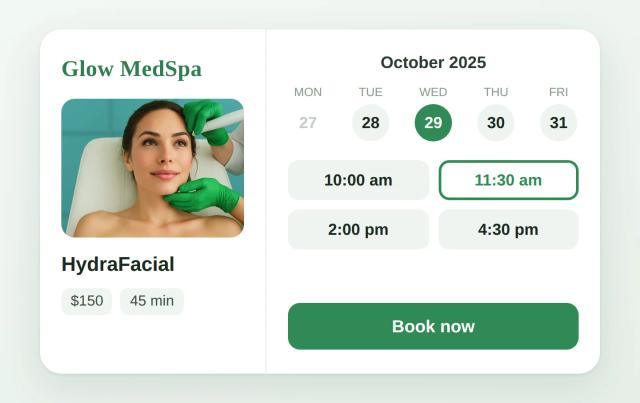
The Workee widget
No account, no password, no app
- Picks a service
- Picks a time
- Name and phone — booked
Both columns end in a booked appointment. Only one of them ends there for someone who has never met you.
How Workee and GlossGenius compare at a glance
GlossGenius publishes both plan families, the card rate and the payout fee. Workee does not publish a rate card. Pricing is custom, based on your clinic’s needs, with no contracts. Pricing verified 18 October 2026.1
| How each vendor charges |  Booking and marketing for med spas | GlossGeniusBeauty-first, with a separate medspa tier |
|---|---|---|
| Plans and pricing | Workee Pro or Workee Business, quoted per clinic | Beauty: Standard $28/mo ($24 billed annually), Gold $56/mo ($48 billed annually), Platinum $168/mo ($148 billed annually). Medspa: Practice Essentials $168/mo ($148 billed annually), Practice Advanced $298/mo ($248 billed annually) |
| Billing unit | Per clinic; team members and locations are covered by Workee Business | Per location per month; each additional location pays the plan price less 15% |
| Digital forms and charting | Forms are part of the platform; clinical charting is not | Included, with medical director sign-off at no extra cost |
| ePrescribe | Not offered | Not offered |
| Reminders and client messaging | Automated SMS, email and WhatsApp reminders are built in; volume depends on your messaging plan | 500 SMS credits on Practice Essentials, 2,500 on Practice Advanced |
| Payroll | Not offered | $40/mo plus $6 per seat |
| Card processing | Stripe or PayPal rates only. Workee adds no markup. | 2.4% + 15c in person; 2.9% + 30c online invoicing; no Tap to Pay fee |
| Contract terms | Month to month, cancel any time | No contract; 14-day free trial, no card required |
You may also be comparing: AestheticsPro, Square Appointments, Pabau, All GlossGenius alternatives, GlossGenius review, Vagaro vs GlossGenius
Keep GlossGenius if these describe you
These are real reasons to pick GlossGenius over Workee. If two or more apply, GlossGenius is probably the better fit, and we would rather you knew now. None of these is a reason not to run Workee as well.

You want charting without an enterprise contract
The medspa tiers put EMR-style charting, photo management, consent and free medical director sign-off behind a published $168 or $298 price. Most platforms with that depth make you book a demo first.

You want the card rate on the same page as the plan price
GlossGenius publishes 2.4% + 15c for in-person payments and 2.9% + 30c for online invoices, with no Tap to Pay fee, next to the plan prices. You can total subscription and processing before you talk to anyone.

You value a clean client-facing experience
Booking, deposits, memberships, packages, before-and-after photos and SOAP notes all live in one client profile.
Choose Workee if the calendar is what needs fixing 👉
Bottom line: For a practice whose booking page is losing first-time clients, Workee usually wins. For one that wants charting and booking on a single simple, inexpensive plan, keep GlossGenius.

Keep your website
Your site is not rebuilt. Workee embeds as a widget showing one treatment, a category, or the full menu, and what appears where is a setting in your dashboard rather than a job for a developer.

Booking with no client account
Service, time, name, phone. No sign-up, no password, no verification email. Loyal clients tolerate an account; a first-time visitor comparing three clinics does not.

We build the flow with you
We go through how your practice books (consults, deposits, packages, who is allowed to do what), set the flow up with you, and train the desk on it.

You do not have to move everything
GlossGenius keeps the charts, the sign-off and the point of sale. Workee takes website booking and the follow-up. Nothing gets exported and nobody relearns a calendar.

An AI front desk that works 24/7
It answers, books and follows up at 2am and on Sundays: win-back for clients who have not been in, birthday offers, seasonal campaigns and rebooking, with nobody at the desk chasing them.

One AI layer for every channel
Lead forms, review requests, SMS, email and Instagram DMs run from one place, instead of a text credit allowance you watch and top up.
🗓️
Keep the charting. Fix the booking page.
Bring your booking page and your treatment list. Fifteen minutes, and you will see exactly what a first-time client meets before they ever reach your EMR.
🔗
Nobody has to switch. Both keep running.
Each point above is a reason to keep what you run now. Workee can sit alongside it.
All new bookings in the calendar you already work from
Workee takes the booking on your website and passes it to the calendar your practice already runs on. No new software for the team, no second calendar to check, no double-booked room.
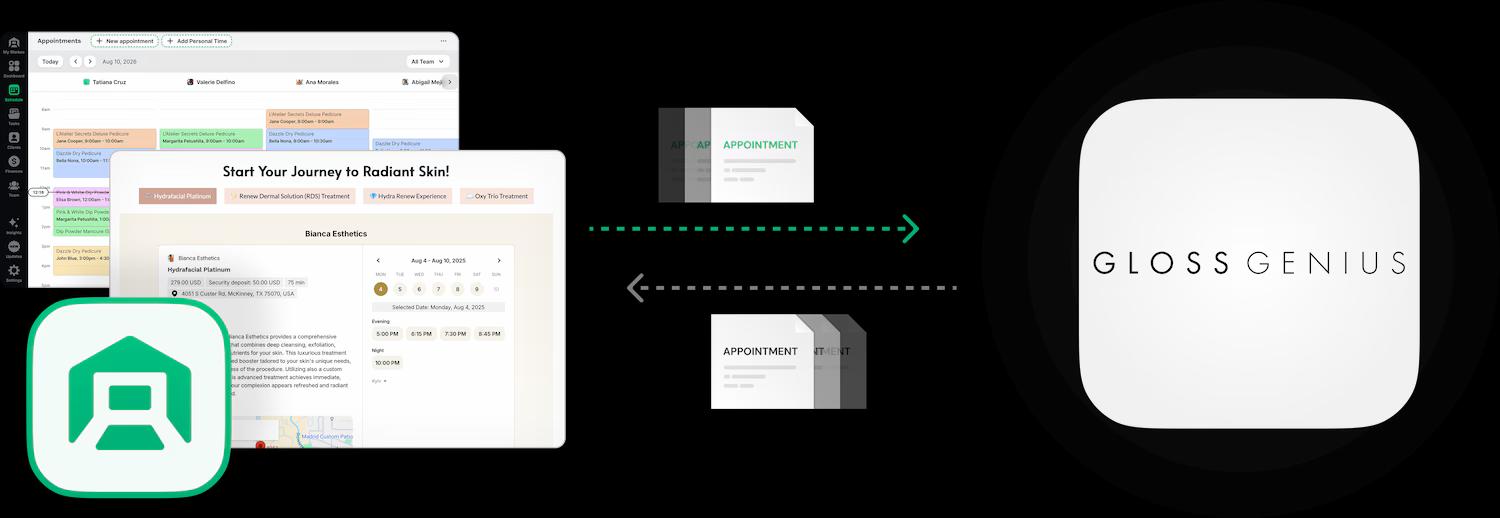

Bookings land in the calendar your team already uses

Clients book on your own website, no account needed

Deposits and no-show fees taken at booking

HIPAA and PCI compliant
A lot of practices settle here and never move further. The full migration steps are below if you want them. See the migration steps
Switching from GlossGenius to Workee
This is the shape of a full migration, and it usually takes four to six weeks, which is one rebooking cycle with both systems still up. Anything specific to your account, such as what your export contains or what your renewal looks like, has to be confirmed with GlossGenius directly.
- 1
Re-check your card processing math
GlossGenius publishes 2.4% + 15c in person and 2.9% + 30c for online invoices, with no Tap to Pay fee. If you take deposits and no-show fees against stored cards, work out what those transactions cost you on each platform before you assume a switch saves money.
- 2
Get the client export before you change anything
Ask GlossGenius for a full client export and confirm in writing which fields it contains and in what format. A client list you cannot retrieve is the most expensive thing to lose in a migration, and the time to ask is while the account is active.
- 3
Decide where the clinical record lives
Charting, consent, photo management and medical director sign-off are included in the medspa tiers, and Workee has no equivalent. Either keep GlossGenius underneath for that, or have another clinical system in place before you cut over.
- 4
Run both systems for one full booking cycle
Keep GlossGenius readable while Workee takes bookings. Four to six weeks covers a typical rebooking interval, which is long enough to see the gaps while you can still fix them.
- 5
Move the booking link last
Your website, Google Business Profile and Instagram link switch only once the new calendar is populated and your team can work it without thinking.
Booking looks different in each of these, and Workee is set up differently for each. Start with the one nearest your practice.

Med spas
Consults, packages and series, with deposits on the treatments that cannot afford a gap.

Dental practices
Recall intervals and hygiene visits that have to arrive on schedule.

Massage therapy
Short repeat cycles, where a missed rebooking is a missed month of that room.

Estheticians
Single rooms and small studios, where the booking page does the work of a receptionist.

Weight loss clinics
Courses of visits rather than one-off appointments, booked as a program.

Wellness businesses
Several practitioners and rooms, where both have to be free at the same time.


Workee vs GlossGenius: common questions
- Can I use Workee alongside GlossGenius?
 Yes. Workee runs alongside it, so it can handle online booking, reminders, rebooking and marketing while GlossGenius keeps charting and payments. Practices that like their clinical setup usually start this way.
- What does GlossGenius charge to process cards?2.4% + 15c for tap, dip or swipe, and 2.9% + 30c for online invoices, with no extra fee for Tap to Pay. Instant payouts carry a 1.8% fee; same-day payouts Monday to Thursday are free. Figures quoted from the GlossGenius pricing page, accessed 18 October 2026.
- Can clients book without creating an account?Yes. Three steps: service, time, name and phone. No sign-up, no password, no verification email. That is the difference between a curious visitor and a booked one.
- Do I have to migrate my data to use Workee?No. You can start with booking only: the widget goes on the website, appointments land in the calendar the team already uses, and GlossGenius keeps handling charting and payments. Moving fully is a separate decision, later or never.
- Will Workee work on my existing website?Yes, that is the usual setup. Workee embeds on the site you already have, whether that is WordPress, Squarespace, Wix, Webflow or something custom, and your dashboard decides whether it offers one treatment, a category, or the whole menu.
- Is Workee cheaper than GlossGenius?It depends on your location count, and Workee does not publish a rate card. Pricing is custom, based on your clinic’s needs, with no contracts. GlossGenius charges the plan price for each location, less 15% after the first, so run the math on every room you operate, then compare that total against a Workee quote for the same footprint.
- Does Workee include EMR or charting?No. Workee has no EMR, charting or medical director sign-off, all of which are included in the GlossGenius medspa tiers. If clinical documentation is the reason you are buying software, that is a real advantage for GlossGenius.
- What should I ask before signing with either vendor?Four things, in writing: the total for every location you run, the card processing rate at your monthly volume, the notice period, and what a full data export contains if you leave. Any vendor that will not answer the fourth one is a vendor you cannot leave.

Fifteen minutes, your actual calendar,
and a clear answer.
Comparing Workee and GlossGenius? Read what customers say on Google
Sources
- GlossGenius pricing page. Accessed 18 October 2026.
