Workee vs Pabau:
the complete system, and the missing half
Pabau is a full clinic system (records, prescriptions, lab requests, consent, inventory, payroll) priced by user count, and its pricing page shows no prices at all. It is the more complete clinical product. What sits outside it is everything that happens before a client exists: your website, the booking form, and the follow-up. Workee takes that in three steps with no client account.1





Everything for a client who has not booked yet
Pabau starts working the moment there is a patient record. The booking form on your website decides whether one ever gets created.
A typical booking widget
An account before the calendar
- Clicks Book on your website
- Create an account
- Choose a password
- Open the verification email
- Log back in
- Finally, pick a service and a time
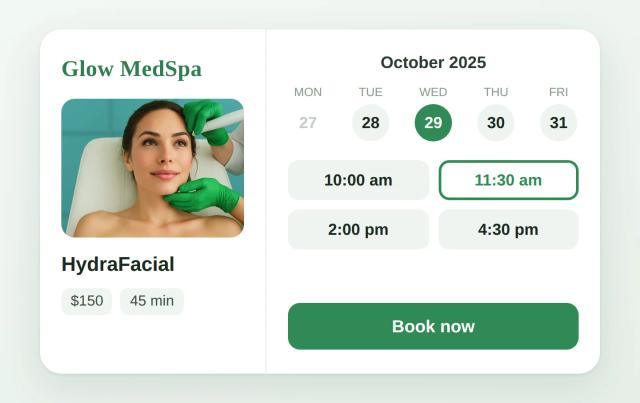
The Workee widget
No account, no password, no app
- Picks a service
- Picks a time
- Name and phone — booked
Consent forms and medical history belong after the booking. Before it, every extra field is a reason to close the tab.
How Workee and Pabau compare at a glance
Pabau publishes no prices. Workee publishes none either: pricing is custom, based on your clinic’s needs, with no contracts. Much of what matters here is not published on either website. Pricing verified 18 October 2026.1
| How each vendor charges |  Booking and marketing for med spas | PabauClinic management system, priced by seat |
|---|---|---|
| Plans and pricing | Workee Pro or Workee Business, quoted per clinic | Not published; Solo, Team, Medium, Group and Enterprise are all quoted on a demo |
| Team size | Multiple team members and locations are covered by Workee Business | Priced by user count; every plan includes every feature |
| Feature gating | Booking, payments, client records and marketing are in every plan | None; plans differ only by user count |
| Digital forms and charting | Forms are part of the platform; clinical charting is not | Included in every plan |
| ePrescribe | Not offered | Prescriptions, repeat prescriptions and lab requests included |
| Marketing | Rebooking flows, follow-ups, loyalty and automations are built in; messaging volume depends on your plan | Marketing Plus add-on; price not published |
| Reminders and client messaging | Automated SMS, email and WhatsApp reminders are built in; volume depends on your messaging plan | Two-way SMS included; SMS pricing not published |
| Card processing | Stripe or PayPal rates only. Workee adds no markup. | Quoted with your plan; not on the pricing page |
| Contract terms | Month to month, cancel any time | No commitment, based on team size |
You may also be comparing: Aesthetic Record, Vagaro, Boulevard, All Pabau alternatives, Pabau review
Keep Pabau if these describe you
These are real reasons to pick Pabau over Workee. If two or more apply, Pabau is probably the better fit. It is a clinic system in a way Workee does not attempt to be. None of these is a reason not to run Workee as well.

You need real clinical depth in an aesthetics shape
EMR and structured clinical notes, prescriptions, lab requests and results, digital consent, and before-and-after photo comparison. This is the toolkit an injectables or dermatology clinic needs to chart defensibly.

You want one system that runs the whole clinic
Scheduling, EMR, forms, payments, inventory and stock, staff rosters, commissions and timesheets all in one product - so stock consumed per treatment and commission per service live with the appointment.

You are small but still need clinical records
Every plan includes the full platform. A one-person clinic is not feature-gated out of clinical records the way tiered competitors do it; you pay for seats, not capability.
Choose Workee if the clinical stack is already sorted 👉
Bottom line: For a practice that just needs its own website to book better, Workee usually wins. For one that wants the complete clinic system, records through payroll, in a single product, keep Pabau.

Keep your website
Your website is left alone. Workee embeds as a widget showing one treatment, a category, or the full list, and what appears where is a dashboard setting, not a change request.

Booking with no client account
Service, time, name, phone. No sign-up, no password, no verification email. The clinical detail is collected once they are a client, not while they are still deciding.

We build the flow with you
We go through how your clinic books (consultations, deposits, courses of treatment, which practitioner does what), set the flow up with you, and train whoever runs reception.

You do not have to move everything
Pabau keeps records, prescribing and inventory. Workee takes the website booking and the marketing. No seat count is renegotiated and no clinical data moves.

An AI front desk that works 24/7
It answers, books and follows up at 2am and on Sundays: win-back for patients overdue a treatment, birthday offers, seasonal campaigns and rebooking, without the desk chasing them.

One AI layer for every channel
Lead forms, review requests, SMS, email and Instagram DMs run from one place, quoted once rather than calculated per tier and per currency.
🔍
One quote, one calendar, fifteen minutes.
Bring your booking page and how many practitioners you run. We will show you what a first-time client sees now and what changes. Pabau is not touched.
🔗
Nobody has to switch. Both keep running.
Each point above is a reason to keep what you run now. Workee can sit alongside it.
All new bookings in the calendar your clinic already uses
Workee takes the booking on your website and passes it to the calendar your clinic already runs on. No new software for the team, no second diary to check, no double-booked practitioner.
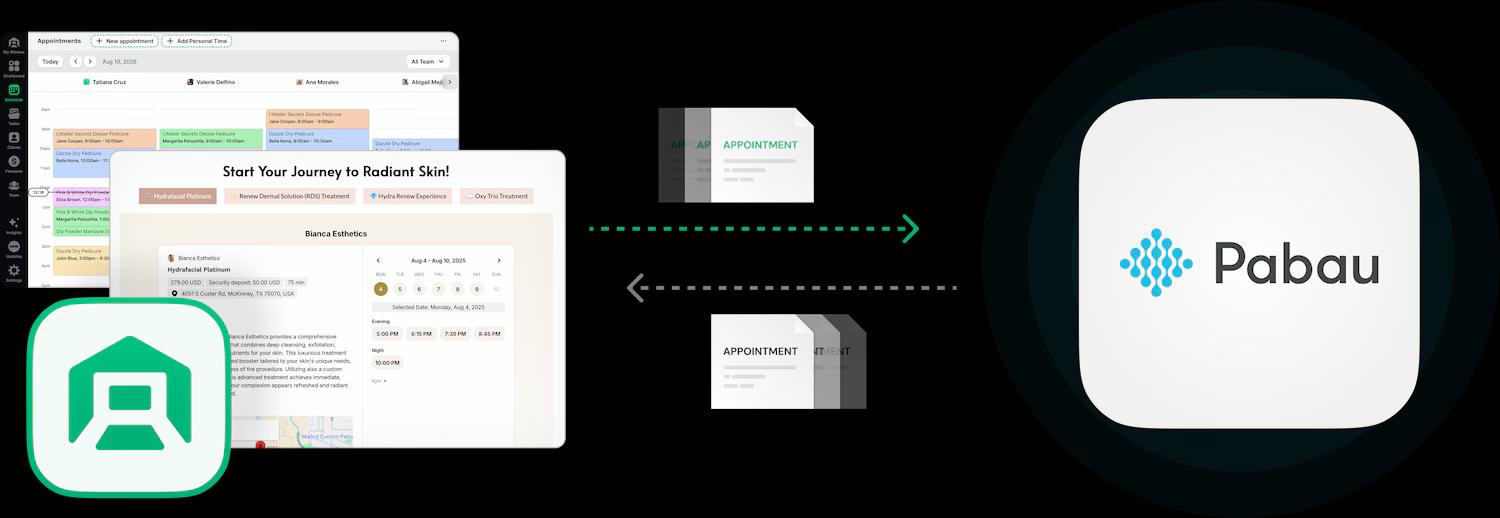

Bookings land in the calendar your team already uses

Clients book on your own website, no account needed

Deposits and no-show fees taken at booking

HIPAA and PCI compliant
Clinics with a system this complete usually keep it. The migration steps are below if you ever want the other option. See the migration steps
Switching from Pabau to Workee
This is the shape of a full migration, and it usually takes four to six weeks, which is one rebooking cycle with both systems still up. Pabau holds more of your clinic than a booking tool does, so the first question is whether you are leaving it at all. This is the general shape; the specifics have to come from Pabau in writing.
- 1
Decide whether this is a replacement or an addition
Prescriptions, lab requests, consent, inventory and commissions have no Workee equivalent. Clinics can keep Pabau for the clinical and operational layer and add Workee in front for demand.
- 2
Get the numbers Pabau does not publish
Tier pricing above one user, the add-on prices, the cash value of an SMS credit, the card processing rate and any migration fee are all private. Ask for each in writing before you compare anything.
- 3
Get the client export before you change your seat count
Ask Pabau for a full client export and confirm in writing which fields it contains and in what format. Clinical records and marketing records are usually separate exports, so request both.
- 4
Run both systems for one full booking cycle
Keep Pabau readable while Workee takes bookings. Four to six weeks covers a typical rebooking interval, long enough to see whether the front end produces appointments.
- 5
Move the booking link last
Your website, Google Business Profile and Instagram link switch only once the new calendar is populated and your team can work it confidently.
Each of these books differently, and Workee is set up differently for each. Start with the one that matches your clinic.

Med spas
Consultation first, treatment second, with deposits where the appointment is expensive to lose.

Dental practices
Recall intervals and hygiene visits that have to come round on time.

Massage therapy
Short repeat cycles, where the next appointment should be made before this one ends.

Estheticians
Single rooms and small teams, where the booking page is the only receptionist.

Weight loss clinics
Courses of treatment booked as a program rather than one visit at a time.

Wellness businesses
Several practitioners and rooms that both have to be free at once.


Workee vs Pabau: common questions
- Can I use Workee alongside Pabau?
 Yes, and for a clinical practice it is usually the sensible arrangement. Workee runs beside an existing system and handles booking, reminders, rebooking and marketing while Pabau stays the clinical and operational system of record.
- What does Pabau not publish?Almost everything. Every plan price, all four add-on prices, SMS pricing, the card processing rate, any setup or migration fee, and the contract term. You cannot budget for Pabau from its website. Figures quoted from the Pabau pricing page, accessed 18 October 2026.
- Can clients book without creating an account?Yes. Three steps: service, time, name and phone. No sign-up, no password, no verification email. Medical history and consent are collected afterwards, in the system you already use for them.
- Do I have to migrate my data to use Workee?No. You can start with booking only: the widget goes on the website, appointments arrive in the calendar the team already uses, and Pabau keeps every record where it is. Moving fully is a separate decision, later or never.
- Will Workee work on my existing website?Yes, that is the usual setup. Workee embeds on the site you already have, whether that is WordPress, Squarespace, Wix, Webflow or something custom, and your dashboard decides whether it offers one treatment, a category, or everything.
- Is Workee cheaper than Pabau?Neither vendor publishes enough to answer that from their websites. Pabau publishes no prices; Workee publishes no rate card and quotes per clinic with no contracts. Ask both for a written quote covering the same team size and compare those.
- Does Workee do prescriptions or inventory?No. Workee has no prescribing, no lab requests, no stock control and no commission tracking. Pabau has all four. If your clinic runs on those, this is not a close comparison and you should keep the clinical system.
- What should I ask before signing with either vendor?Four things, in writing: the total for your exact team size, the card processing rate at your monthly volume, the notice period, and what a full data export contains if you leave. Any vendor that will not answer the fourth one is a vendor you cannot leave.

Fifteen minutes, your actual calendar,
and a clear answer.
Comparing Workee and Pabau? Read what customers say on Google
Sources
- Pabau pricing page. Accessed 18 October 2026.
