Workee vs Zenoti:
you are not doing that rollout twice
Zenoti is an enterprise platform with real clinical depth, sold by quote against your footprint and delivered through a white-glove migration and a phased rollout. If you have already been through that, the last thing you need is another implementation. Workee goes on the website you already have and takes bookings in three steps with no client account, while Zenoti keeps running the clinic.1





The enterprise rollout stopped at your booking page
Everything inside the building got the enterprise treatment. The form on your website did not, and it is the only part a stranger ever touches.
A typical booking widget
An account before the calendar
- Clicks Book on your website
- Create an account
- Choose a password
- Open the verification email
- Log back in
- Finally, pick a service and a time
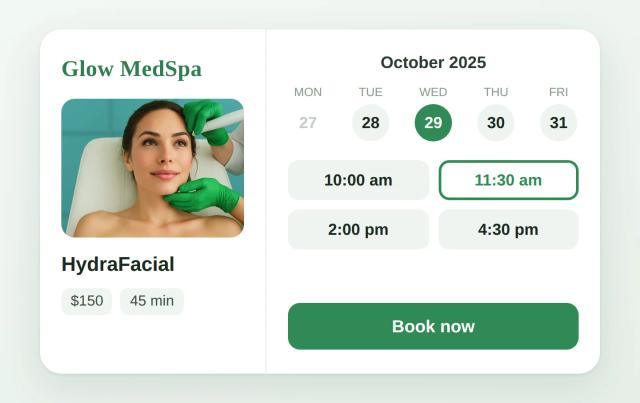
The Workee widget
No account, no password, no app
- Picks a service
- Picks a time
- Name and phone — booked
A new client will not complete a sign-up to find out whether you have a Thursday slot. A returning one already would have called.
How Workee and Zenoti compare at a glance
Neither vendor publishes a rate card, which makes this the one comparison where both columns have the same gap. Everything below is quoted from Zenoti’s own pages. Pricing verified 18 October 2026.1
| How each vendor charges |  Booking and marketing for med spas | ZenotiEnterprise platform, quoted by footprint |
|---|---|---|
| Plans and pricing | Workee Pro or Workee Business, quoted per clinic | By quote against your footprint; no rate card published |
| Multi-location | Multiple team members and locations are covered by Workee Business | Built for multi-location groups, one system across every site |
| ePrescribe | Not offered | Surescripts, EPCS and non-EPCS, priced with your quote |
| AI features | Jenny, the AI marketing employee, is part of the Workee platform | AI Plus, a separately priced package |
| Reminders and client messaging | Automated SMS, email and WhatsApp reminders are built in; volume depends on your messaging plan | Voice, SMS and messaging billed on consumption |
| Card processing | Stripe or PayPal rates only. Workee adds no markup. | Quoted with your contract; not on the pricing page |
| Contract terms | Month to month, cancel any time | Quoted per group; not stated on the pricing page |
| Getting started | Live in days, running alongside Zenoti | White-glove migration and a phased rollout |
You may also be comparing: Mangomint, Fresha, GlossGenius, All Zenoti alternatives, Zenoti review, Boulevard vs Zenoti, Zenoti vs Vagaro
Keep Zenoti if these describe you
These are real reasons to pick Zenoti over Workee. If two or more apply, Zenoti is probably the better fit, and at enterprise scale the wrong answer here is expensive to undo. None of these is a reason not to run Workee as well.

You run several locations and need one system across them
Zenoti is built and sold for chains. Pricing is explicitly footprint-based and implementation is phased with dedicated experts. That machinery is overkill for one location and the right answer for twelve.

You need real clinical records for injectables
Structured treatment notes capturing product, units, lot number and treatment area, before-and-after photos inside the HIPAA environment, a signed BAA, and Surescripts ePrescribe including EPCS. That is a genuine differentiator over general salon software.

You want to collapse a stack of subscriptions
Voice, SMS, messaging, payments, marketing and clinical records sit in one contract. If you are currently paying eight vendors, consolidation has real value.
Choose Workee if you want to start this month 👉
Bottom line: For a practice that wants a fast website booking fix without an enterprise rollout, Workee usually wins. For one collapsing a stack of subscriptions into a single enterprise contract, keep Zenoti.

Keep your website
No new implementation. Workee embeds as a widget on the site you already have, showing one treatment, a category, or the full menu, and you change what appears where from your dashboard, not through a project.

Booking with no client account
Service, time, name, phone. No sign-up, no password, no verification email. The people it matters for are the ones who found you tonight and have never spoken to your clinic.

We build the flow with you
We go through how your practice books (consults, deposits, programs, which provider does what), set it up with you and train the team. Days, not a phased rollout.

You do not have to move everything
Zenoti keeps the clinic, the records and the reporting. Workee takes the website booking and the follow-up. Nothing is exported, nothing is renegotiated, and no one has to reopen the contract.

An AI front desk that works 24/7
It answers, books and follows up at 2am and on Sundays: win-back for clients who have not been in for a while, birthday offers, seasonal campaigns and rebooking, without waiting on the front desk.

One AI layer for every channel
Lead forms, review requests, SMS, email and Instagram DMs run from one place, priced in your quote rather than metered as a separate consumption line.
📄
Fifteen minutes, no sales cycle, no discovery phase.
Bring your booking page and your provider list. We will show you what a first-time client sees now and what they would see with Workee on it. Zenoti is not touched.
🔗
Nobody has to switch. Both keep running.
Each point above is a reason to keep what you run now. Workee can sit alongside it.
All new bookings in the calendar your team already uses
Workee takes the booking on your website and passes it to the calendar your clinic already runs on. No integration project, no data migration, no second system for the team to check.
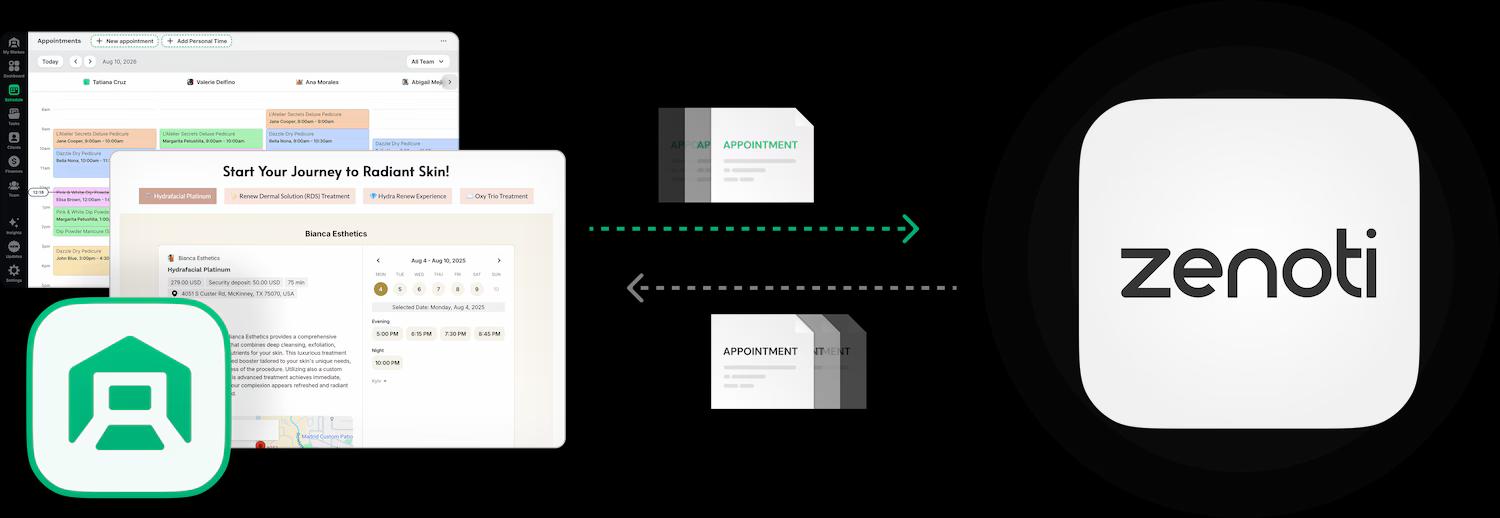

Bookings land in the calendar your team already uses

Clients book on your own website, no account needed

Deposits and no-show fees taken at booking

HIPAA and PCI compliant
Many groups run it this way indefinitely. If you ever do decide to consolidate, the steps are below. See the migration steps
Switching from Zenoti to Workee
This is the shape of a full migration, and it usually takes four to six weeks, which is one rebooking cycle with both systems still up. Leaving an enterprise platform is a project, not an afternoon. This is the shape of it; the specifics of your agreement have to come from your Zenoti account team in writing.
- 1
Read your agreement before you do anything else
Zenoti does not publish contract terms, which means yours are whatever you signed. Find the term length, the notice period, the renewal date and any early-termination clause, and have someone who is not the person who signed it read them too.
- 2
Get the client export while the account is in good standing
Ask for a full client export and confirm in writing which fields it contains and in what format. Do this before you give notice. A client list you cannot retrieve is the most expensive thing to lose in a migration.
- 3
Decide what the clinical record is for
Lot-number-level injectable records, EPCS prescribing history and treatment photography are the parts of Zenoti with no Workee equivalent. Many groups keep Zenoti for exactly that and add Workee in front of it rather than replacing anything.
- 4
Migrate one location, not all of them
If you run several sites, prove the new setup on a single location through one full booking cycle of four to six weeks before the group follows. A phased rollout is the one enterprise habit worth keeping.
- 5
Move the booking links last, site by site
Each location’s website, Google Business Profile and Instagram link switches only once that calendar is populated and its team can work it confidently. Nothing is visible to clients until this step.
Each of these books differently, and Workee is configured differently for each. Start with the one that matches your practice.

Med spas
Consult first, treatment second, with deposits on the appointments you cannot afford to lose.

Dental practices
Recall cycles that have to fire on time across several chairs and hygienists.

Massage therapy
High-frequency repeat visits, where the rebooking is worth more than the booking.

Estheticians
Single rooms and small teams, where the website is the only front desk there is.
Weight loss clinics
Multi-visit programs rather than one-off appointments, booked as a course.

Wellness businesses
Practitioners and rooms that both have to be free at the same moment.


Workee vs Zenoti: common questions
- Can I use Workee alongside Zenoti?
 Yes, and for a group with clinical requirements that is usually the right answer. Workee runs alongside it and handles booking, reminders, rebooking and marketing while Zenoti stays the system of record for treatments.
- Does Zenoti do ePrescribe?Yes, through a Surescripts integration supporting both EPCS and non-EPCS prescribing. Zenoti does not publish a price for it. Workee has no prescribing feature at all. Figures quoted from the Zenoti pricing page, accessed 18 October 2026.
- Can clients book without creating an account?Yes. Three steps: service, time, name and phone. No sign-up, no password, no verification email. That is the whole difference for someone who has never been to your clinic and is comparing three of you at once.
- Do I have to migrate my data to use Workee?No. You can start with booking only: the widget goes on the website, appointments arrive in the calendar the team already uses, and Zenoti carries on exactly as it does today. Consolidating is a separate decision, later or never.
- Will Workee work on my existing website?Yes, that is the normal setup. Workee embeds on the site you already have, whether that is WordPress, Squarespace, Wix, Webflow or something custom, and you choose from your dashboard whether it offers one treatment, a category, or everything.
- Is Workee cheaper than Zenoti?Neither vendor publishes a rate card, so nobody can answer that from public information, including us. What we can say is that Workee is quoted per clinic with no contracts, and Zenoti is quoted against your footprint with terms it does not publish. Get both quotes in writing for the same scope and compare those.
- Does Workee do clinical records?No. Workee has no EMR, no structured treatment notes and no prescribing. If defensible clinical documentation is why you are buying software, Zenoti is the more serious product and this comparison should end there.
- What should I ask before signing with either vendor?Four things, in writing: the total for your exact location and provider count, the card processing rate at your monthly volume, the notice period and renewal terms, and what a full data export contains if you leave. Any vendor that will not answer the fourth one is a vendor you cannot leave.

Fifteen minutes, your actual calendar,
and a clear answer.
Comparing Workee and Zenoti? Read what customers say on Google
Sources
- Zenoti pricing page. Accessed 18 October 2026.
