

Med Spa Software Onboarding Checklist: A 30-Day Rollout Plan

In short: Med spa software onboarding is the work between choosing a platform and trusting it with a real operating day. In a 30-day plan, name who owns each record, configure services and policies, test data, permissions, booking and payments, pilot one bounded workflow with real staff, and cut over only after readiness gates pass. Keep a reversible path, and involve privacy leads and qualified counsel if you handle protected health information.
Software onboarding is the work between choosing a platform and trusting it with a real operating day. For a medical spa, that means more than importing names and opening the calendar. The clinic must decide which system owns each record, configure services and policies, test money and communication states, train the people who handle exceptions, pilot a narrow workflow, and keep a reversible path through go-live.
The safest 30-day plan has four phases:
define ownership and configure the operating model;
clean and test data, permissions, booking, and payments;
pilot one bounded workflow with real staff; and
cut over only after the readiness gates pass.
This checklist is operational guidance, not legal, privacy, accounting, or clinical advice. A clinic that creates or handles electronic protected health information should involve its privacy and security leads and qualified counsel in vendor contracting, access, migration, retention, and incident planning.
What is med spa software onboarding?
Med spa software onboarding is the controlled process of turning a purchased platform into a working clinic system. It covers configuration, data ownership, migration, permissions, integrations, staff training, journey testing, pilot use, cutover, and post-launch stabilization.
Onboarding is not the same as vendor selection. If the clinic is still choosing categories and finalists, start with the med spa tech-stack guide and medical spa software buyer scorecard. Return to this checklist after the implementation owner and system scope are named.
Before day 1: write a one-page rollout charter
Do not begin with an import file. Begin with a decision record that everyone can read.
The charter should name:
the accountable owner who can accept or delay go-live;
the systems, locations, teams, and workflows in scope;
the workflows explicitly out of scope for this release;
the intended go-live date and pilot window;
the old system's read-only, export, and retirement plan;
the privacy, security, clinical, payment, and finance reviewers;
the vendor or internal support contacts and response path;
the measures that define a safe launch; and
the conditions that trigger rollback or a delayed launch.
A vague goal such as “move everything into the new software” invites scope creep. A better goal is: “One location will run consultation booking, confirmations, deposits, checkout, and approved follow-up in the new system, while clinical documentation remains in the established clinical record.” The actual boundary will vary, but it must be explicit.
Days 1–5: name the owner and map every source of truth

Assign one source of truth for each record type before anyone imports or configures data.
Create a source-of-truth matrix before configuring a field or moving a record. For each data type, name the system that creates the record, the system allowed to edit it, the systems that receive a copy, and the owner who resolves a conflict.
At minimum, map:
client identity and contact details;
clinical documentation and images;
service catalog, provider eligibility, rooms, and availability;
appointment status;
marketing permission and communication preferences;
deposits, charges, refunds, tips, and receipts;
packages, memberships, or balances;
campaign source and lead status; and
operational and financial reporting.
The answer can be different for each row. An EMR may own clinical notes, while a scheduling platform owns availability and a payment processor owns transaction authorization. “All systems own everything” is not a source-of-truth plan.
Put privacy and security review inside the rollout
The HHS summary of the HIPAA Security Rule says regulated entities must use reasonable and appropriate administrative, physical, and technical safeguards for electronic protected health information. It also makes clear that the rule applies to covered entities and business associates, not automatically to every business that uses the word “clinic.” Determine the clinic's status and obligations with qualified advisers.
If a vendor will create, receive, maintain, or transmit ePHI on behalf of a covered entity, involve the privacy and security leads in the business-associate analysis and contract review before sending production data. Record approved uses, access roles, retention, export, deletion, incident contacts, and any prohibited data paths.
Days 6–10: configure the clinic before importing clients
Build the operating skeleton in a non-production workspace or controlled setup wherever the vendor supports it.
Configure locations, people, and permissions
Create only the roles the clinic can explain. Common roles include owner, location manager, front desk, provider, marketer, finance reviewer, and system administrator.
Test each role against real tasks:
Can it view, create, edit, export, refund, message, or publish?
Can a marketer see clinical information that the marketing job does not require?
Can front-desk staff reverse a payment or change a policy without approval?
Can a former worker's access be removed promptly?
Is there an audit trail for material changes?
Do not copy administrator access to everyone because setup is faster that way.
Configure services as operating rules
For every appointment type, record:
public name and internal identifier;
location and eligible provider;
duration, cleanup time, and buffer;
price, deposit, or free-consult status;
direct-booking or consultation-first path;
cancellation and no-show rule;
preparation and confirmation message;
room or equipment dependency; and
follow-up owner and next eligible step.
Workee's current booking page documents availability, time-zone handling, buffers, reminders, and free or paid appointments. The September 2026 update documents saved-method authorization, deposits and balances, post-appointment checkout, no-show fees when configured, payment links, refunds, receipts, and transaction activity. Confirm the exact plan, integration, and clinic configuration before treating any field as ready.
Days 11–15: clean, sample, and reconcile the data
Do not import a full archive to discover that duplicate people, obsolete services, or ambiguous balances came with it.
Use a four-step migration test:
Inventory. List each export, owner, date range, field, attachment type, and legal or operational retention need.
Clean. Standardize phone and email formats, resolve obvious duplicates, retire obsolete service names, and separate missing data from intentionally blank data.
Sample. Import a small, representative set that includes a new client, returning client, package or membership holder, balance or deposit, opt-out, duplicate, canceled appointment, and refund.
Reconcile. Compare counts and critical fields before and after the sample. Record what transformed, what failed, and what will remain in a read-only archive.
Never use ordinary email or an unapproved shared drive to move sensitive exports merely because it is convenient. Use the clinic's approved transfer method and restrict access to the people performing and verifying the migration.
Keep payment data inside approved payment paths
Do not place full card numbers, security codes, or copied payment credentials into migration spreadsheets. The PCI Security Standards Council's merchant guidance explains that organizations accepting cards retain payment-security responsibilities even when they use service providers. Let the approved processor and vendor handle permitted token or saved-method transitions, and document what must be reauthorized by the client.
Days 16–20: rehearse the failure paths
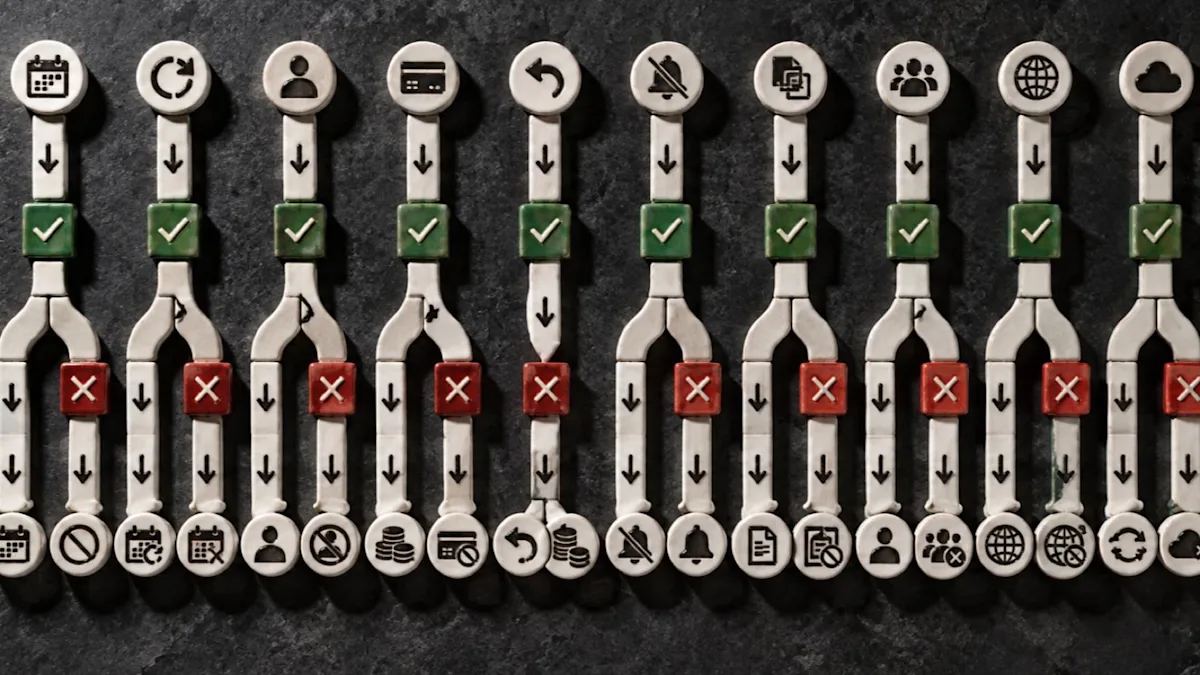
A rollout is ready only when the exception paths have owners, evidence, and stop rules.
The happy path proves that one ideal booking can work. It does not prove the clinic can operate.
Run these ten journeys with test data:
a new inquiry that needs a human answer before booking;
a new client booking the correct consultation, location, and provider;
a returning client using the correct service interval or package;
a reschedule that preserves payment and appointment status;
a cancellation or no-show handled under the approved policy;
a failed payment, partial refund, and receipt correction;
an opt-out or permission change that stops the relevant message;
a duplicate client record that must be merged or escalated;
a provider absence that changes availability and ownership; and
an integration or synchronization failure that leaves one system stale.
For each journey, capture the expected state, actual state, evidence, owner, and stop rule. Link defects to a decision: fix before pilot, accept temporarily with a documented workaround, remove from scope, or delay go-live.
Test communication as a state machine
Write the trigger, audience, message purpose, permitted channel, exit condition, and human escalation for each automation. A confirmation should stop when the appointment is canceled. A rebooking message should not continue after a client opts out or enters a path that requires staff review. A payment failure should not silently become a marketing sequence.
Workee's March 2026 update says Jenny can follow up, send timely reminders and promotions, support loyal-client and repeat-visit workflows, recover lost bookings, and show sent messages and results. The September update says Lead Forms can capture contact details, service interest, consultation requests, and general inquiries for team follow-up. These are supporting workflow capabilities; they do not replace the clinic's clinical record, legal review, or escalation policy.
Days 21–24: pilot one location, service family, and team
A pilot is not a soft launch for everyone; it is a narrow test with a named exit decision.
Choose a scope large enough to reveal real handoffs but small enough to reverse. For example: one location, two providers, consultation plus one noncomplex service family, one payment rule, and the approved confirmation/reminder sequence.
During the pilot:
hold a ten-minute daily review with the implementation owner;
log defects and workarounds in one place;
reconcile bookings and payments every day;
review every automated message and exception;
note staff questions that indicate unclear policy or training; and
keep the old system available under the approved read-only or fallback plan.
The pilot passes only when the team can complete the normal day and recover from defined exceptions without hidden spreadsheets, shared passwords, or conflicting records.
Days 25–27: decide whether the clinic is ready
Use five readiness gates. “Mostly ready” is not a pass for a blocking gate.
Gate 1: identity and security
Named roles have the minimum access required; test accounts are removed or labeled; former users are disabled; sensitive exports are controlled; and the privacy/security reviewers have accepted the production data path.
Gate 2: booking and client experience
The right services, locations, providers, times, buffers, prices, policies, confirmations, and next steps appear across desktop and mobile. Ineligible paths stop or route to a person.
Gate 3: money
Deposits, balances, tips, refunds, no-show actions, receipts, packages, and payouts reconcile under the clinic's approved policies. Staff know who can approve exceptions.
Gate 4: staff operations
Each role can find its queue, complete the task, escalate uncertainty, and identify the current source of truth. Training includes at least one failure path, not only a feature tour.
Gate 5: reporting and rollback
The clinic can reproduce the counts needed to monitor launch, identify a failed sync or incomplete migration, and execute the documented rollback or delay decision.
Days 28–30: cut over and stabilize
Set a change freeze for nonessential configuration. Publish one go-live schedule that states the last old-system update, final export, import, verification, staff login window, booking-path switch, and support coverage.
On launch day:
verify the production URL, service catalog, availability, and policies;
run one controlled booking and payment journey;
confirm the record appears in every expected system once;
verify the confirmation and internal notification;
test the cancellation or refund path appropriate to that journey;
reconcile the first production transactions; and
log every deviation with an owner and deadline.
Do not make silent fixes that erase the evidence of a defect. Record the original state, change, reviewer, and retest result.
Use a 30-day stabilization scoreboard
After go-live, review a small set of operational measures at a fixed cadence:
booking starts and completed bookings by appointment type;
abandoned or failed booking states;
no-shows and late cancellations using fixed definitions;
duplicate or incomplete client records;
payment failures, refunds, and reconciliation exceptions;
messages sent, opt-outs, delivery failures, and human escalations;
integration or sync exceptions;
staff support tickets and time spent on workarounds;
rebooked appointments where the workflow is in scope; and
product-page visits, CTA interactions, leads, bookings, and assisted conversions where measurement is approved.
Compare like with like. A launch week with one service and two providers is not directly comparable with the prior whole-clinic month. Annotate configuration changes so a later improvement or decline is not attributed to the wrong cause.
Where Workee fits in the rollout
Workee can be configured as the primary platform for documented booking, client-management, payment, and growth workflows, or connected to currently listed calendars such as Vagaro, Zenoti, GlossGenius, and Google Calendar. Its public pages document booking and availability, free or paid appointments, reminders, client activity, Lead Forms, payments, campaigns, and Jenny automation.
The implementation owner should still verify:
which system remains authoritative for clinical documentation;
which client and appointment fields synchronize in the selected connection;
how historical records and duplicates are handled;
which payment states and balances migrate or require new authorization;
what messages are enabled, reviewed, and stopped; and
what export and fallback evidence the clinic needs.
Do not infer an EMR, prescribing, clinical decision, or universal integration capability from a booking or marketing feature. Confirm the exact configuration in a Workee demo and keep the clinical/privacy boundary explicit.
Frequently asked questions
How long should med spa software onboarding take?
There is no universal duration. Thirty days is a practical planning frame for a bounded rollout, not a vendor guarantee. A multi-location migration, clinical-record change, complex payment transition, or unresolved data-quality problem may require a longer phased plan.
Should a med spa migrate every historical record?
Not automatically. Migrate the data the clinic is permitted and operationally required to use in the new system. Keep other records in an approved read-only archive when that better preserves meaning, access controls, retention, and auditability. Have legal, privacy, clinical, and accounting owners approve the decision.
Should the old and new systems run in parallel?
A narrow parallel or read-only period can reduce risk, but uncontrolled dual entry creates conflicts. Define which system is authoritative during each phase, who may update it, and the exact date when the rule changes.
What is the most important go-live test?
Run a complete real-world journey that crosses booking, client identity, payment, communication, and reporting, then run at least one exception. The important result is not that each feature opens; it is that the states remain consistent and the team can recover when they do not.
What should staff training include?
Train by role and journey. Each person should complete the tasks they own, recognize a state they must not change, handle or escalate an exception, and locate the approved source of truth. A recorded feature tour alone is not operational readiness.
Launch the operating system, not just the login
The goal is not to turn on every feature in 30 days. It is to establish a trustworthy operating path that the clinic can explain, test, observe, and reverse.
If Workee is in your shortlist or selected stack, bring this checklist to a Workee demo. Ask the team to map your services, calendars, booking rules, payment states, Lead Forms, reminders, and follow-up controls to the five readiness gates before you choose a go-live date.



Keep updated about latest industry insights and subscribe to our newsletter
Follow Us


