
Vagaro review pricing, strengths and limits for med spas
Vagaro is a low-entry platform priced per bookable calendar: $23.99 a month for one, as an introductory rate for six months, then $30. Forms, a website, an online cart and texts are paid extras, and it offers ePrescribe through ScriptSure. This review sticks to what Vagaro publishes.1
Get a Demo
Vagaro at a glance
Vagaro is a low-entry, heavily-metered platform priced per calendar. Every figure here is quoted from Vagaro’s own pricing page, accessed 18 October 2026.
- Entry price
- $23.99/mo introductory rate for the first 6 months (then $30/mo), includes 1 bookable calendar
- Contract terms
- Month to month, cancel any time
- Card processing rate
- 2.6% + 10c under $4k/mo volume; 2.29% + 19c above, plus a $10/mo merchant fee
- ePrescribe
- ScriptSure: $40/mo per doctor + $5/mo per medical assistant

Workee adds booking on your own website and Jenny, an AI front desk that confirms each booking, follows up after visits to rebook, recovers abandoned bookings and wins back clients who have gone quiet, by text and email. Vagaro keeps running the rest. Workee vs Vagaro
What Vagaro publishes about its pricing
Every row is quoted from Vagaro’s own pricing page, accessed 18 October 2026. “Not published” means Vagaro does not say.
| Item | Vagaro |
|---|---|
| Entry price | $23.99/mo introductory rate for the first 6 months (then $30/mo), includes 1 bookable calendar |
| Additional staff | $10/mo per calendar, up to 7 licenses |
| Cost ceiling | After 7 paid licenses, extra staff are free |
| Digital forms | $10/mo add-on |
| Website builder | MySite $20/mo |
| Online cart | $10/mo |
| ePrescribe | ScriptSure: $40/mo per doctor + $5/mo per medical assistant |
| Accounting integration | QuickBooks $10/mo; Xero $10/mo |
| SMS | Credit plans from $20/mo for 1,000 credits up to $2,500 for 500,000 |
| Email included | 1,000 free per month; overage rate not published |
| Card processing rate | 2.6% + 10c under $4k/mo volume; 2.29% + 19c above, plus a $10/mo merchant fee |
| Contract terms | Month to month, cancel any time |
Vagaro: strengths and limits
Where Vagaro is strong
 You need a full clinical CRM in one system
EMR-style charting, SOAP notes, before-and-after comparison, e-forms and true ePrescribe through ScriptSure, all inside the same platform that books the appointment. Among mainstream salon platforms a real prescribing path is rare, and it makes Vagaro a serious option for injectables and weight-loss practices.
- You have a large team in one location
Billing stops at seven paid calendars and every staff member after that is free. A 25-provider location pays the same base as a 7-provider one. Very few competitors do this.
- You want one vendor for everything
Payroll, website builder, branded app, shopping cart, check-in kiosk, accounting integrations and a consumer marketplace are all first-party.
Where Vagaro falls short
 The add-ons add up
Digital forms are a $10/mo add-on, the MySite website builder $20/mo and the online cart $10/mo, and texts are bought as credit plans from $20/mo for 1,000. Your monthly bill ends up above the entry price.
- The headline price is introductory
$23.99 is the rate for the first six months; the standard rate is $30/mo for one bookable calendar, plus $10/mo for each additional calendar up to seven licenses.
- Card processing has two tiers
Under $4,000 a month in volume, in-person cards are 2.6% + 10c; above that, 2.29% + 19c plus a $10/mo merchant fee. Model it at your real monthly volume before comparing.
- Deals now cost a share of each booking
Since Get Featured became Vera Fill My Books, Daily Deals carry a per-booking fee: 20% of the cart when a new customer books and 5% for an existing one, taken as a deposit at online booking. Vagaro’s support team says a deal applied to all services puts every new-customer booking under the 20% fee, wherever the client found you.
Running Vagaro? What Workee adds
Workee runs alongside Vagaro. These are screens from the Workee app.
Jenny answers and qualifies new enquiries
A lead fills in a form on your website, Jenny asks your qualifying questions in chat and books a time.
- Lead forms where Jenny answers questions, qualifies and books new leads
- Booking on your own website, no client account
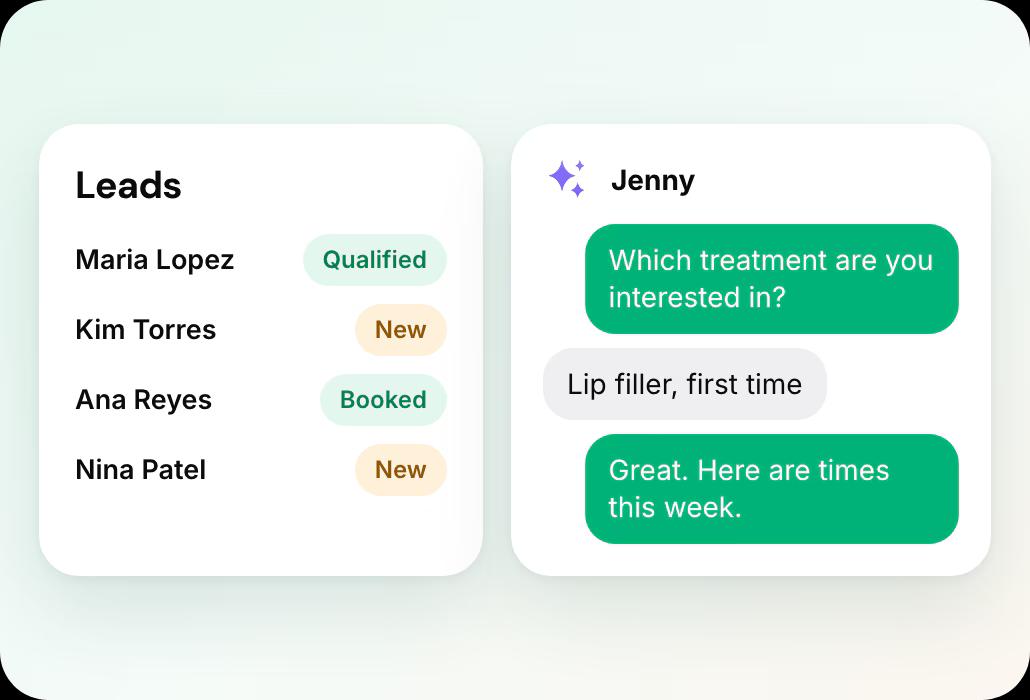
Jenny brings clients back
Welcome messages, rebooking and win-backs show on the Marketing dashboard, and new offer ideas wait in Action Items for your approval.
- Jenny confirms bookings, rebooks after visits and wins back quiet clients by text and email
- Email and SMS campaigns, Google review requests and holiday offers

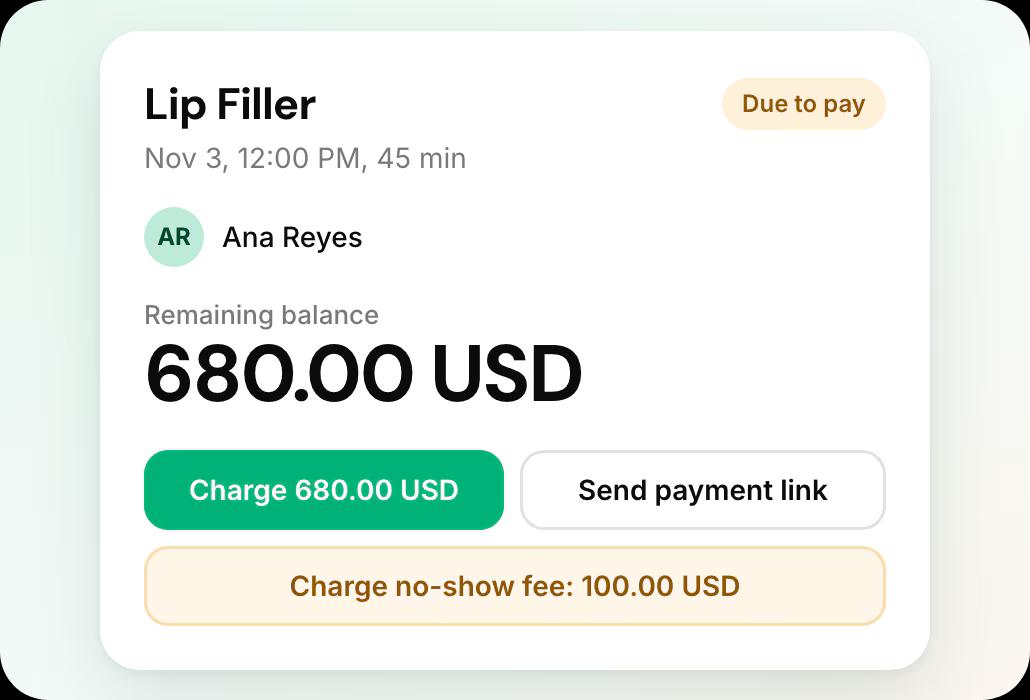
Deposits and no-show fees on every appointment
Each appointment shows what was paid, and the card on file lets you charge a no-show fee or send a payment link.
- Deposits, no-show fees and cards on file
Leaving Vagaro what it involves
From Vagaro’s own help documentation, accessed 18 October 2026.
Your client list
Only the business owner can export the customer list, to PDF or Excel. Reports are exported one at a time.
Records and retention
Notes and form responses come out per customer; no bulk export of photos is described. Vagaro publishes no deletion date for a cancelled account.
The full export guide
Every step, in order, with sources.
Compare Vagaro further
Workee vs Vagaro
How Workee runs alongside Vagaro, or replaces it.
Vagaro alternatives
The platforms med spas weigh against Vagaro.
Vagaro vs Fresha
The two side by side, from each vendor’s own pricing page.
Vagaro vs GlossGenius
The two side by side, from each vendor’s own pricing page.
Zenoti vs Vagaro
The two side by side, from each vendor’s own pricing page.
Boulevard vs Vagaro
The two side by side, from each vendor’s own pricing page.
Vagaro review: common questions
- Is Vagaro good for med spas?
 It fits a practice that wants a clinical CRM in one system, a large team in one location, or one vendor for everything. Budget for the extras on top of the calendar price: forms at $10 a month, the MySite website at $20, the online cart at $10, and texting credit plans from $20.
- How much does Vagaro cost?The advertised US rate is $23.99 a month including one bookable calendar, an introductory rate for the first 6 months ($30/mo standard), plus $10 per additional calendar up to seven licenses, after which extra staff are free. Add-ons are separate: forms $10, website $20, cart $10, QuickBooks $10, and SMS credit plans from $20.
- What does Vagaro charge to process cards?Under $4,000 a month in volume, 2.6% + 10c for tap, dip or swipe. Above that, 2.29% + 19c plus a $10 monthly merchant subscription. Keyed transactions are 3.5% + 19c on both tiers. Note that a "as low as 2.2%" claim appears in Vagaro marketing but does not match its published rate schedule.
- Does Vagaro charge a fee on Daily Deals?Yes, since Get Featured became Vera Fill My Books. Vagaro’s help center says Daily Deals and Vera promotions carry a per-booking fee of 20% for a new customer and 5% for an existing one, calculated on the whole cart after discounts and collected as a deposit when the client books online. There is no monthly fee, and no fee when a deal brings no booking. Opting out switches off your Daily Deals and Get Featured.
- Can I keep Vagaro and add Workee?Yes. Workee takes bookings on your own website and passes them to the calendar you already run, and Jenny follows up with clients by text and email, so Vagaro keeps handling the rest. If you later move fully, Workee has its own calendar, payments and client records, and imports your client list from a spreadsheet.

Running Vagaro today?
See what Workee adds to it.
Sources
- Vagaro pricing page. Accessed 18 October 2026.
- Vagaro — Cancel or Pause Your Vagaro Subscription. Accessed 18 October 2026.
- Vagaro Support: Changes to Get Featured and Daily Deals. Accessed 20 October 2026.
