

Instagram Comments: Which to Answer, Hide or Take Offline
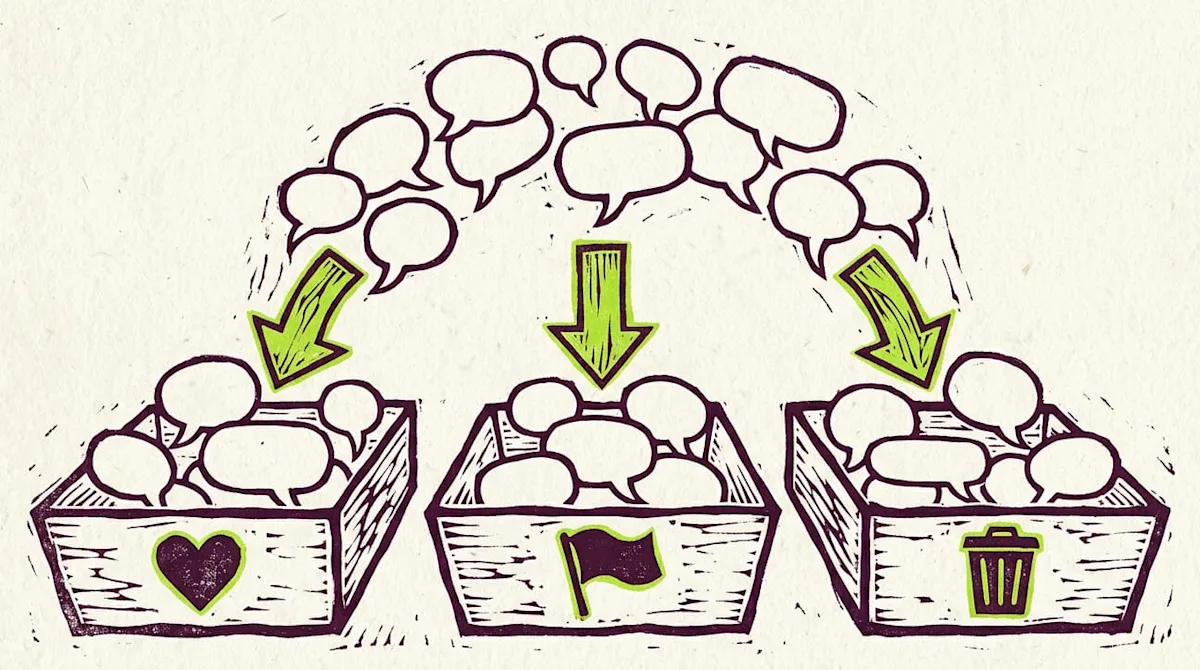
In short: Sort every Instagram comment on your clinic's posts into one of three buckets. Answer questions and kind words in public, take complaints and anything personal or medical offline to a DM or phone call, and hide or delete spam, scams and abuse with Instagram's tools. Check comments at least once or twice during working hours and soon after you post.
Every Instagram comment on your clinic's posts fits one of three buckets. Answer questions and kind words in public. Take complaints and anything personal or medical offline, to a DM or a phone call. Hide or delete spam, scams and abuse with Instagram's own tools.
Sorting comments this way keeps your posts friendly and useful. People who are thinking about booking see quick, helpful answers. Problems get handled privately, by the right person. And junk does not sit under your best content.
Below is how to handle each bucket, the Instagram tools that help, and a short daily routine for you or your team.
Sort every comment into three buckets
Before you reply, decide which bucket the comment belongs in.
Answer in public: questions about services, hours, location, parking, booking, and compliments.
Take offline: complaints, questions about someone's own health or treatment, billing problems, and anything that would make a person share private details.
Hide or delete: spam, fake offers, scam links, bots, and abusive or hateful comments.
When you are not sure, ask one question: would I be comfortable if every follower read my answer and the person's reply? If not, take it offline.
Answer: questions and kind words
Public answers do double duty. They help the person who asked and everyone else reading the post.
Reply the same day. A fast reply shows you are present.
Keep it short. One or two sentences.
Use their name if it is easy. It feels personal.
Point to one next step. Book through the link in bio, or send a DM for details.
Thank people for compliments. A simple "Thank you, see you soon!" is enough.
Some questions are better finished in a DM, like price questions that depend on the person. Reply in public with a friendly invite to message you, then handle the details there.
Take offline: complaints, health and private matters
Never argue in the comments. Even if the comment is unfair, a public fight makes your clinic look worse than the original complaint did.
Here is a calm reply that moves the conversation:
Hi Dana, we are sorry to hear this and want to make it right. Please send us a DM or call us at the front desk so our manager can help.
Then follow through. The person who left the comment should hear from a real person on your team soon.
Also take these offline:
Questions about their own treatment. "Is this normal after my visit?" deserves a provider's answer, in private, not a public comment.
Anything that confirms someone is a patient. Do not say "we saw you last Tuesday" in public. Even friendly replies can reveal private details.
Billing and refund issues. Move them to a phone call or a private message.
Keep a simple rule for your team: in public, acknowledge and invite. In private, solve.
Hide or delete: spam, scams and abuse
Instagram gives you several tools for this. You can use them by hand from the app.
Hide a comment. On your own post, you can hide a single comment. Instagram says hidden comments stay in your total count and the person who wrote it is not told.
Hidden Words. Add a custom list of words, phrases and emojis you do not want under your posts. Comments that use them are hidden. The same help page explains the "Hide unwanted comments" filter.
Delete a comment. You can delete comments others leave on your posts.
Limits. Instagram's Limits feature temporarily filters unwanted comments and messages from groups of accounts. It helps during a sudden wave of spam.
Block from commenting. You can block a specific person from commenting on your photos and videos.
Restrict. Restricting someone is a quieter option for an account you do not want to block outright.
Hide or delete?
Hiding is a good default for spam and for comments that are rude but not dangerous. It removes the comment from view without a fight. Delete comments with scam links or threats, and report accounts that break Instagram's rules. Do not hide honest complaints just because they sting. Reply and take them offline instead.
Write a few saved replies
Your team will answer faster, and sound the same, with a short set of saved replies. Write one for each common case, then change a word or two each time so replies never look pasted.
Booking question: "Thanks for asking! You can book through the link in our bio, or DM us and we will help."
Compliment: "This made our day. Thank you!"
Complaint: "We are sorry to hear this. Please DM us or call the front desk so we can help."
Health question: "Great question for our provider. Send us a DM and we will set up a quick chat."
A daily comment routine
A few minutes a day keeps comments under control.
Check at set times. Morning and late afternoon is a simple start.
Sort first. Read new comments and put each one in a bucket.
Clean up. Hide or delete spam and abuse.
Answer. Reply to questions and compliments.
Escalate. Send complaints and health questions to the right person with a note.
Follow up. Check that every offline case got a real reply.
Update your word list. If the same spam keeps coming back, add those words to Hidden Words.
Write the routine down so anyone covering the account knows what to do. If someone moves from a comment into your DMs, make sure that person ends up in your client records, not lost in a notification.
Where Jenny fits
Jenny for Instagram from Workee is launching in early November 2026. Once you connect your professional Instagram account, Jenny replies to comments in public as your clinic and invites the person to DM you. She leaves one reply per comment at most, or skips it and hands it to you. Complaints go to your team by text, and Jenny pauses in that thread. Jenny also hides spam in your comments.
A comment alone does not create a lead. When the person sends a DM, Jenny asks your qualifying questions and sends your booking link or the next step you pick. You can still use all of Instagram's own tools, and you can take over or stop anytime.
Instagram comment questions from clinic owners
Should I delete negative comments?
Usually no. Reply calmly, apologize where it fits, and invite the person to DM or call. Hide or delete only spam, scams, threats and abuse. A handled complaint can show future clients that you care.
Does Instagram tell people when I hide their comment?
No. Instagram's help center says the person who wrote a hidden comment is not notified. The comment still counts toward your total comment count.
How often should I check Instagram comments?
At least once or twice during working hours, and soon after you post. Quick answers on a fresh post help the people reading it right now.
Keep your comments clean and helpful
Answer the good ones, take the hard ones offline, and hide the junk. See how Instagram comment replies with Jenny will help you keep up.



Keep updated about latest industry insights and subscribe to our newsletter
Follow Us


