

ChatGPT Business Profile: How to Claim and Optimize Yours in Business Hub

In short: On November 10, 2026, OpenAI launched Businesses in ChatGPT in beta. Through Business Hub at chatgpt.com/business-hub, an eligible business can claim its profile, correct the information ChatGPT shows about it, and see aggregate insights on mentions and website clicks.
Claiming takes two approvals, each reviewed on its own: the claim itself, and a separate Persona identity check. Publishing a Business Agent is not a third approval — it is an optional product with its own eligibility, and most local clinics will not qualify for it today. Business Hub is unrelated to the paid ChatGPT Business subscription, it is not a Google Business Profile, and OpenAI states plainly that claiming does not guarantee you will be recommended. For a med spa or dental practice, the honest first step is a two-minute eligibility check: search your business name in Business Hub and see what comes back.
What "Businesses in ChatGPT" actually is
OpenAI describes Businesses in ChatGPT as a way for businesses to "claim their business, manage their information, and see insights on how people engage with them on ChatGPT," reaching what OpenAI says is 1.2 billion weekly ChatGPT users (Introducing Businesses in ChatGPT, November 10, 2026).
The owner-facing dashboard is called Business Hub, and you reach it from the sidebar inside ChatGPT once you are signed in. Inside it you can submit a claim, complete verification, edit a defined set of business details, and — after approvals — open an Insights tab.
Three things it is not:
It is not the ChatGPT Business subscription
"ChatGPT Business" is OpenAI's paid seat-based plan for teams, listed at $20–25 per user per month on OpenAI's business pricing page. Business Hub is the dashboard where you claim your listing — a different product with a confusingly similar name. OpenAI publishes no fee for claiming or managing a profile, and does not call it free either (see the FAQ below). What it does state is that you do not need a paid ChatGPT plan, an Ads account or a ChatGPT Enterprise agreement to claim an eligible business.
It is not a Google Business Profile, and there is no sync
Editing your Google listing does not update your ChatGPT profile, and editing your ChatGPT profile does not touch Google. The field sets are different and narrower on ChatGPT's side. OpenAI also notes that "ChatGPT may also use other sources when answering questions about your business" — so your profile is one input, not the only one.
It is not an advertising product
OpenAI states that advertising does not influence ChatGPT's independent answers, and that claiming, publishing an agent, and advertising are three separate things.
How your business can appear when ChatGPT talks about it
When a business appears in a ChatGPT response, a user can click through to that business's ChatGPT profile. Per OpenAI's documentation and launch post, the profile can carry the details you submit — website, description, product or service category, logo, cover photo, and optional fields — and, for retailers who connect a product feed, pricing and availability. If a Business Agent is published, the user can also start a clearly labelled, separate conversation with that agent.
A blue check appears on the profile once your identity verification is approved. (OpenAI's marketing page describes the blue check as showing a profile "has been claimed," while the more detailed help article says claiming alone does not earn the badge and that it follows Persona approval. We follow the help article here; expect this wording to settle.)
Why accuracy matters more than volume here: an unclaimed profile is assembled from whatever public sources ChatGPT has. If your hours, address, service list or website URL are stale on the open web, that is what a prospective patient sees — and for a clinic, a wrong phone number or an outdated service menu is a lost consultation, not a cosmetic problem.

Eligibility is not published as a list. The only reliable check is to search your own business in Business Hub.
Who can claim a profile right now
Per OpenAI's help article and policy pages, eligibility is not published as a category list. What is stated:
You must own the business or be authorized to represent it, and you must pass verification.
Eligibility "depends on factors including industry, location, and our verification and integrity checks."
Availability depends on the business's location and type, and on where ChatGPT is available with the required verification supported.
OpenAI may decline a request, and may "hold off on allowing businesses in other categories to create or claim profiles until we have the safeguards needed to support them responsibly."
"Local stores and restaurants can currently claim only an existing U.S. listing."
OpenAI's launch post links the phrase "eligible categories" to the Business Agents Policy — and that policy contains no category list. It says OpenAI weighs "both the business category and the agent's intended use before allowing publication" and that "business verification alone does not guarantee agent eligibility."
What this means for a clinic: OpenAI's documentation does not name medical spas, aesthetic clinics or dental offices in either direction. The restriction it does spell out names stores and restaurants, so we cannot tell you from the documentation whether your clinic falls inside or outside it. Do not take an agency's word for it, including ours. Search your business in Business Hub and read what the screen offers you. That is the only current source of truth, and it takes two minutes.
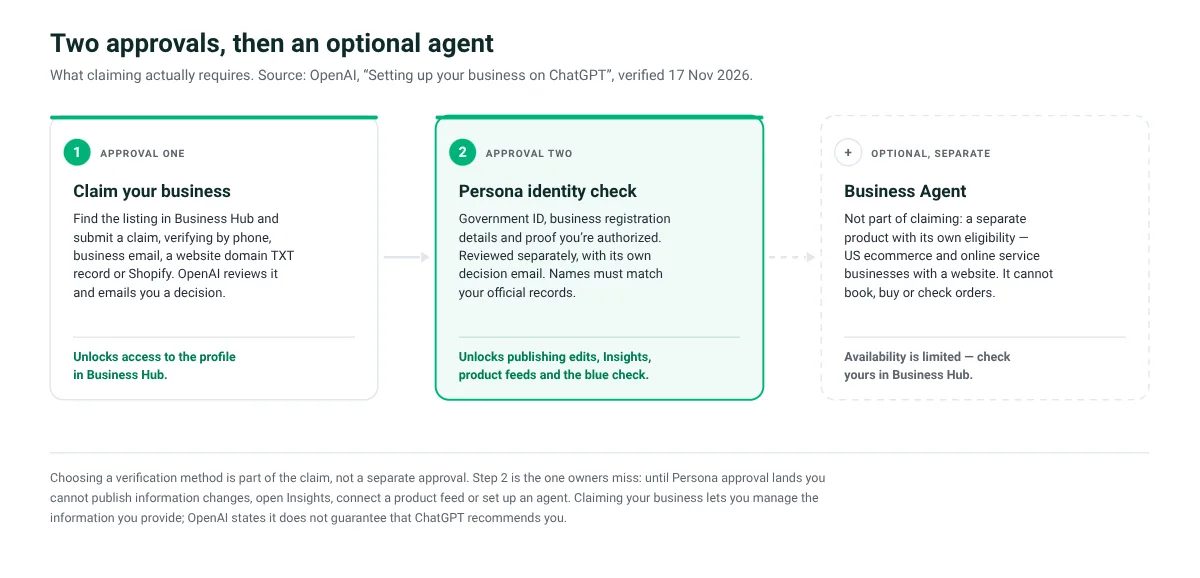
Persona approval — the second of the two — is the gate most owners miss. Until it clears you cannot publish edits, open Insights, connect a feed or set up an agent. Choosing a verification method is part of the claim, not an approval of its own.
How to claim your business in ChatGPT: the steps
Sign in to ChatGPT and open Business Hub from the sidebar. Use the account you intend to manage the business with long-term — a claim is tied to the account that started it. If your listing requires a tenant admin, the designated administrator of your organization's ChatGPT Enterprise workspace has to start the claim from their own account.
Search for your business by name. Search the name as it appears publicly, then try your legal name and common misspellings before concluding nothing exists.
Select the listing that matches your business and confirm the ChatGPT account that will manage it. Check the address and website on the listing before selecting — claiming the wrong location of a multi-site practice creates work to undo.
Choose a verification method from the ones offered on that listing. Options may include business phone (SMS or automated call), business email, website domain, or Shopify store. Available methods vary by listing. If you cannot receive a code at the number or address shown, check which other methods appear — website domain verification uses a TXT record in your DNS and does not require changing your public phone number, which is usually the easiest path for a clinic whose front desk line rings to a system that cannot read codes. Copy the record's type, name/host and value exactly; DNS changes take time to propagate; then return to ChatGPT and select Verify domain.
Wait for claim approval. OpenAI reviews the claim and emails a decision or a request for more information. While it is under review you can select Cancel claim. Submitting a claim requests review — it does not grant access.
Complete identity verification with Persona. This is a separate gate, and the important one. Claim verification confirms your connection to the business; Persona verifies you. Even if you verified by domain or connected Shopify, you still need Persona approval before you can publish information changes, view insights, connect a product feed, or set up an eligible agent. Expect to provide a government-issued ID, business registration information, and proof that you are authorized to represent the business. Use the legal name from your registration documents in the legal-name field and your trade name in a DBA field if one is offered — OpenAI's example is a shop called River Street Coffee registered as River Street Foods LLC. Make the registered address and any registration or tax number match your records exactly, because mismatches are the common failure.
Wait for verification approval, then publish your details. OpenAI reviews and emails a decision. One caution worth reading twice: if you use Persona to create a new profile, OpenAI's approval automatically publishes it — there is no separate publish step — so only continue when you are ready to be live.
To return to a claim you started, sign in with the same ChatGPT account, open Business Hub, select Business, and open the existing profile. If you received a personal claim invitation, use the link in that invitation and sign in with the exact email address it was sent to — and do not forward it to a colleague or agency to give them access.
If your business isn't found, or someone already claimed it
Not found
OpenAI's help article says that if you run an eligible online business you may see an option to add it, and in the same breath that local stores and restaurants can currently claim only an existing US listing. So for a local clinic, "nothing found" may genuinely mean "nothing to do yet in Business Hub." That is not a dead end — it moves the work to your website and public footprint, which is where most of the leverage sits anyway. Re-check Business Hub periodically; OpenAI says it plans to expand to more markets and categories over time.
Already claimed
Open the profile, select the more options menu (•••), then Dispute ownership, and follow the prompts to verify with Persona that you are authorized to represent the business. OpenAI notes that claiming a profile or disputing ownership does not change its visibility in ChatGPT.
Listing locked
If you see Contact support, the listing is locked and support has to open access. For brands using a managed claim process, individual location profiles stay locked by default and you should ask your OpenAI account contact about the supported path.
Verification pending or failed
Wait for the decision email rather than resubmitting — review time varies. If a Persona check fails or expires, follow the email's instructions; if Try again is offered, correct the mismatched details and resubmit. Note that only unpublished draft profiles can be deleted, and OpenAI support states it cannot delete, unpublish or hide a published profile as part of a setup or ownership request.

Website domain verification uses a DNS TXT record — usually the easiest route for a clinic whose front desk line can't receive a code.
The optimization checklist
Split the work into two lists, because only one of them is under your control inside Business Hub.
Editable in Business Hub (after claim and Persona approval)
Business name — match your public, real-world name; the legal name belongs in the legal-name field.
Business description — write it for a patient deciding between two clinics, not for a keyword. Lead with what you do, who you treat, and where.
Product or service category — pick the single category that best matches your primary service line.
Website — point it at the page that answers the question a searcher just asked, and make sure it resolves without a redirect chain.
Logo and cover photo — current branding, correct crop.
Delivery and return policies — relevant to retail; complete them if you sell products.
Product feed — only if you sell products. OpenAI states that connecting a feed does not publish an agent or guarantee that ChatGPT recommends your products.
Teammates and agency access — the admin who claimed the business can add teammates and grant an agency access, each using their own ChatGPT account.
Not editable in Business Hub — this is website and public-footprint work
One service page per service you actually sell, stating what is included, whether a consultation is required, how pricing is determined, and the policy on deposits and cancellations. Our med spa service page template lays out that structure.
One real location page per location with address, hours, services offered there, and the correct booking route.
Consistent public details everywhere — name, address, phone, hours, services and booking URL identical across your site, Google Business Profile and the directories that matter in your trade. Our 90-day local SEO plan for med spas covers that workflow.
Crawlable, verifiable answers. The med spa website AEO checklist covers how to write answers a person and a machine can both verify, and how to get your med spa found in ChatGPT Search covers the crawler and citation side.
Real reviews, consistently collected. See getting more Google reviews for a beauty business.
Everything you submit has to follow the Businesses in ChatGPT policy: accurate and current information, no fabricated reviews or endorsements, no unsupported guarantees, no concealed fees or conditions, no misleading claims about prices, availability, qualifications or likely results. For an aesthetics or dental practice, that last clause is the one to brief your marketing writer on.
Be explicit about the limit: improving your website does not directly edit your ChatGPT profile. OpenAI says ChatGPT may draw on other sources when answering questions about your business, which is why the public record matters — but there is no documented mechanism by which a site change rewrites a profile field. Treat the two tracks as related, not connected.
How to read the insights dashboard
After both approvals, open your business in Business Hub and select Insights. OpenAI documents aggregate activity over the past 28 days:
Mentions. The definition differs by business type, and this matters. For an online business, a mention counts when ChatGPT references the business's website — the brand name alone does not count. For a local business, a mention counts when ChatGPT shows a result for that location, even if the customer never opens the listing or visits the site.
Website clicks. How often people click through to your site.
Discovery topics. Common themes in ChatGPT answers that mentioned or cited your business. OpenAI is explicit that these are aggregate categories — they do not reveal individual prompts and do not directly measure customer intent.
Two things to internalise before you report these numbers to anyone:
You never see conversations. OpenAI states businesses do not receive individual prompts or consumer conversations, including chats with their own business agents. Insights are aggregated and available only when there are enough conversations or interactions to meet certain thresholds.
A dash is not a zero. OpenAI says a blank metric can mean activity has not reached the reporting threshold, that data is still being collected, or that reporting is unavailable — and that it "doesn't necessarily mean zero activity." For a single-location clinic, blank metrics in the first weeks are the expected outcome, not a verdict on your visibility. If a metric stays blank, OpenAI's guidance is to contact support.
The Business Agent: optional, separate, and limited in availability
A Business Agent is a separate, optional product: a labelled chat with your business, launched from your profile, that answers questions using information and instructions you provide. It is distinct from ChatGPT's own answers and from your profile.
Who can build one, per OpenAI: eligible US ecommerce and online service businesses with a website whose claim and Persona verification are both approved and which meet the Business Agents Policy. OpenAI states explicitly that a verified profile alone does not establish that you can create an agent, and that some businesses can manage a profile without being eligible for an agent.
What it cannot do — directly relevant if you were hoping for AI booking inside ChatGPT:
It cannot complete purchases, make bookings, or check a customer's order. OpenAI's documented experience is that the agent explains products and policies and links to your website, where the customer completes those actions.
It cannot give advice that legally requires a professional license, claim professional credentials, or automate high-stakes decisions without human review.
It must not ask for health details or other high-risk personal information, and must not submit a form, booking or purchase on a user's behalf without explicit authorization through an approved feature.
It must be clear that it is AI representing the business, and not appear to be an independent adviser, a human, or endorsed by OpenAI.
OpenAI does not publish a list of eligible or ineligible categories, so we cannot tell you from the documentation that your clinic is shut out. What the documentation does say is that the current scope is US ecommerce and online service businesses with a website, that eligibility is decided case by case, and that an agent cannot book an appointment even where it is available. Check your own eligibility in Business Hub rather than assuming either way, and plan around the profile in the meantime.
Where Workee fits
Workee is booking and marketing software for med spas, beauty and wellness businesses, dental clinics and plastic surgery practices in the US and Canada. We are not an OpenAI partner, we have no influence over what ChatGPT recommends, and no software can buy you visibility in an AI answer.
What we can do is the part that decides whether discovery turns into a booked appointment. Workee connects to your existing Vagaro, Zenoti or Boulevard calendar and turns your own website into the booking destination — no new account for the client to create, no redirect, two-way sync so you do not get double-booked. When a ChatGPT answer, a Google result or an Instagram link sends someone to your site, the next step is a working booking path rather than a contact form. Jenny, our AI front desk, confirms bookings, follows up, wins back quiet clients by text and email, and asks for Google and Yelp reviews — the public proof that makes your clinic easier to verify in the first place. And you can take deposits, no-show fees and cards on file so the appointments you win actually happen.
If you want to see it against your own calendar, book a 15-minute demo or read how Workee works for medical spas and dental practices.
Frequently asked questions
Is claiming a ChatGPT business profile free?
OpenAI's launch post, product page and help article do not state a fee for claiming or managing a profile — and, as of November 17, 2026, none of them describes it as free either. What OpenAI does state is that you do not need an Ads account or a ChatGPT Enterprise agreement to claim an eligible business. Treat it as "no published fee at launch" rather than a guarantee, and check OpenAI's pages before budgeting.
Do I need a paid ChatGPT plan, or to run ads?
No. OpenAI states that claiming your business, publishing an agent and advertising are separate, and that you can claim an eligible business without advertising or opening an Ads account. The similarly named ChatGPT Business subscription is an unrelated paid team plan.
Can my agency or marketing manager manage this for me?
Yes. Per OpenAI, the admin who claimed the business can add teammates in Business Hub and grant an agency access to manage the business or its agent, with each person using their own ChatGPT account. Two cautions from the documentation: for a business claimed inside a ChatGPT workspace, invitees may need to be members of that workspace, and you should never forward a personal claim invitation to give someone access.
Does claiming my profile mean ChatGPT will recommend my clinic?
No, and OpenAI says so directly: claiming lets you manage the information you provide, but "doesn't guarantee increased visibility or give you direct control over ChatGPT's independent recommendations." Advertising does not influence those independent answers either. Claiming is about controlling your own facts, not buying placement.
Can one company manage several brands or locations?
An authorized admin can manage several business profiles, but each distinct brand gets its own profile — even when several brands sit under one company. OpenAI states there is no single parent profile that manages every brand or automatically claims its locations, and that for brands using a managed claim process individual location profiles remain locked by default, with your OpenAI account contact as the route to the supported claim path.
I updated my details and nothing changed in ChatGPT. Why?
OpenAI reviews and publishes changes to business details, and says updates can take time to appear in a listing or a generated answer. ChatGPT may also draw on other sources, so a saved change does not mean every answer reflects it immediately.
My insights are blank. Does that mean nobody is finding me?
Not necessarily. OpenAI states a blank metric can mean the activity has not reached the reporting threshold, data is still being collected, or reporting is unavailable. Insights cover a 28-day window and are only shown once interactions meet certain thresholds, so small single-location businesses should expect sparse data early on.
Can a dental practice or med spa build a Business Agent that books appointments?
Not in the way the question hopes. OpenAI states that agents cannot complete purchases, make bookings or check orders — they explain offerings and link to your website, where the customer acts. On eligibility, the documented scope is eligible US ecommerce and online service businesses with a website that meet the Business Agents Policy; OpenAI publishes no category list and reviews business category and intended use case by case, so check your own status in Business Hub rather than assuming. The policy also bars advice that legally requires a professional license and the collection of health details, which matters for any clinic.
Last verified: November 17, 2026. Primary sources:
Businesses in ChatGPT is in beta and eligibility, fields and insights are changing; re-verify before relying on any detail here.



Keep updated about latest industry insights and subscribe to our newsletter
Follow Us


