

Med Spa CRM Software: 10 Workflow Tests Before You Buy

In short: A med spa CRM should make the next nonclinical action obvious without becoming a clinical chart. Rather than counting features, test whether it can show who a person is, what has happened so far, which communication permissions apply, what should happen next, and who owns that action when the normal path breaks. Run demo journeys that include exceptions, and confirm you can export the relationship record.
A med spa CRM should make the next nonclinical action obvious without turning the CRM into a clinical chart. It should connect an inquiry, client identity, communication preference, booking history, payment context, follow-up owner, and measurable outcome in one reliable workflow.
The best way to choose med spa CRM software is not to count features. Test whether the system can answer five operational questions:
Who is this person?
What happened so far?
What communication permission and preference apply?
What should happen next?
Who owns that action when the normal path breaks?
This guide gives you ten tests and three demo journeys to answer those questions. It treats the CRM as a client-relationship and growth-operations layer. It does not assume that a CRM is an electronic medical record, treatment chart, or suitable place for protected health information.
What is med spa CRM software?
Med spa CRM software is a system for managing nonclinical relationships with leads and clients across inquiry, consultation, booking, attendance, follow-up, rebooking, and retention. A useful CRM keeps the relationship history and next action visible to the people responsible for sales and service operations.
That job is different from two adjacent systems.
A CRM is not automatically a booking system
A booking system owns availability, service duration, provider assignment, buffers, appointment status, and the client's scheduling actions. A CRM may receive those events and use them to trigger work, but it should not create a second, conflicting version of the calendar.
For booking-page and confirmation design, use Workee's med spa booking-flow audit.
A CRM is not automatically a clinical record
An authoritative clinical system may need to hold medical history, treatment notes, prescriptions, clinical consent, photographs, or other regulated records. Do not put that material into a general CRM merely because it has a notes field.
The HHS cloud-computing guidance says a cloud provider that creates, receives, maintains, or transmits electronic protected health information for a HIPAA covered entity or business associate is itself a business associate, even when it cannot view encrypted data. The parties need the appropriate agreement and safeguards. Whether that applies to your clinic and proposed workflow is a fact-specific legal, security, and contracting question.
Write down which system owns the clinical record and which data must never enter the CRM before a vendor demo.
Map the record before comparing features

Define the minimum record and its owner before comparing a CRM's feature list.
Define the minimum nonclinical record the team needs to move a relationship forward. For most clinics, that means:
identity and reliable contact details;
acquisition source and original inquiry;
communication permission, preference, and opt-out state;
appointment and attendance state;
relevant payment or balance status without copying card data;
relationship owner and current stage;
last completed action; and
next action, due time, and exception reason.
Each field needs one source of truth. If the CRM, booking tool, payment platform, and staff spreadsheet can all change the same status independently, the clinic does not have a reliable record. It has four opinions.
Test 1: capture the inquiry with its source
Create a test lead from each real entry point: website form, phone call, social message, referral, event, and walk-in if applicable. The CRM should preserve the original source, timestamp, service interest, location, and staff owner without forcing the lead into a medical intake form.
Pass when the team can see where the inquiry came from and what was requested. Fail when every new contact becomes “website lead,” source fields are overwritten, or unstructured notes are the only context.
The dedicated med spa lead-form template covers what to ask before booking. This CRM test begins after the inquiry is submitted.
Test 2: prevent duplicate identities
Use a test person who submits a form with one email address, later calls from a shared phone, and then books with a shortened name. Ask the vendor to show how staff detect, review, and merge possible duplicates.
Pass when the system proposes a controlled merge, preserves source history, and records what changed. Fail when records silently combine or staff must search several screens before knowing whether the person already exists.
Test 3: make ownership and response time visible
Every actionable inquiry needs an owner and a due state. Test what happens when the assigned coordinator is off, the lead replies after hours, or the task becomes overdue.
Pass when another authorized staff member can see the queue, the original owner, the deadline, and the escalation rule. Fail when ownership lives in a private inbox or a lead can remain “new” indefinitely with no visible exception.
Test 4: move from inquiry to booking without retyping
Take a qualified inquiry through a consultation or service booking. Check whether the client, service interest, location, provider, and source survive the handoff. Confirm that the booking system remains the authority for availability and appointment status.
Pass when the CRM links to the correct booking and changes the lifecycle state from an actual event. Fail when staff copy data manually, create a second appointment, or mark a lead converted merely because a link was sent.
Test 5: keep permission and preference separate from convenience
A stored phone number is not the same thing as permission for every message. Test separate operational and marketing preferences, the source and time of an opt-in, an opt-out, and a do-not-contact request.
Pass when suppression follows the person across lists and future imports. Fail when deleting someone from one campaign leaves them active in another, or staff cannot explain why a person was eligible for a message.
Have qualified counsel review the clinic's consent language and messaging practices. The CRM should preserve approved decisions; it should not invent them.
Test 6: show a usable relationship history
Open the profile of a returning client. A coordinator should be able to see the nonclinical timeline that matters: inquiry, booked consultation, completed appointment, cancellation, approved communication, payment status, follow-up, and next action.
Pass when the timeline is chronological, attributable, and filterable. Fail when meaningful events are buried in free-text notes or staff cannot tell whether a message was sent, delivered, answered, or stopped.
The HHS Security Rule summary describes role-appropriate access and risk-management obligations for regulated entities handling ePHI. Even when a CRM is intentionally kept nonclinical, role design, auditability, and access reviews are sound buyer questions.
Test 7: route exceptions to a human
Enter three replies: a scheduling question, a clear opt-out, and a possible clinical concern. The CRM should not treat them as equivalent.
Pass when the scheduling question goes to operations, the opt-out stops the relevant automation, and the clinical concern is routed to the clinic's approved human pathway without an automated diagnosis or treatment answer. Fail when every reply keeps the same sequence running.
Test 8: connect payment context without duplicating payment data
The coordinator may need to know whether a deposit is due, a transaction failed, or a refund is pending. That does not mean the CRM should store card details or become the payment ledger.
Pass when the CRM displays the minimum approved status and links to the authoritative transaction. Fail when staff copy sensitive payment data into notes or revenue reports cannot reconcile to the payment system.
Use the payment-processing workflow tests for deeper authorization, settlement, refund, and reconciliation evaluation.
Test 9: report stages and outcomes with definitions
Ask the vendor to build a report using your definitions for:
new qualified inquiries;
first response completed;
consultations booked;
consultations completed;
treatment or service bookings completed;
lapsed clients assigned for follow-up; and
clients rebooked after the defined action.
Pass when each count can be traced to records and events. Fail when a dashboard labels a sent link as a conversion, mixes locations, or changes historical totals when a stage name is edited.
Do not adopt a vendor benchmark without understanding the denominator and attribution window. Start with your own definitions and compare performance over time.
Test 10: export the relationship record
Request a sample export before signing. It should include stable identifiers, field names, timestamps, ownership, permission states, activity history, and the relationships among clients, appointments, and tasks in a documented format.
Pass when the clinic can retrieve its usable data, understands export limits and cost, and can test a restore or migration. Fail when only summary PDFs are available or important history disappears outside the interface.
Run three demo journeys, including the exceptions
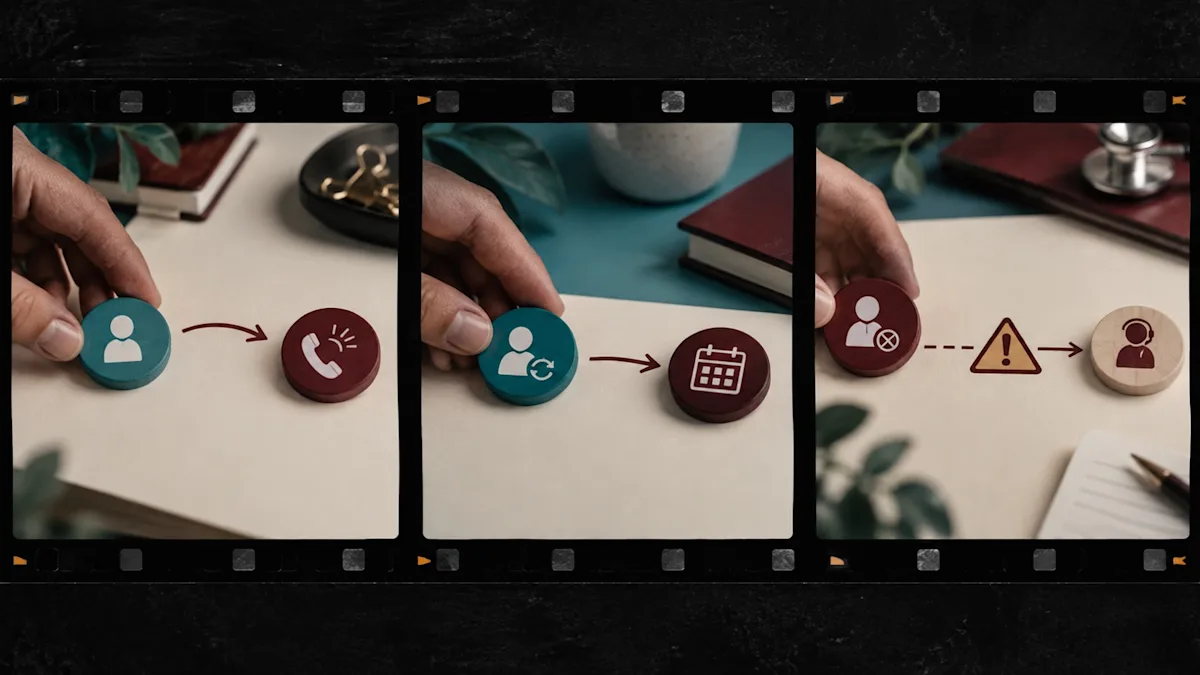
A credible demo includes the ordinary path, the returning-client path, and the exception path.
Do not let each vendor choose a polished demo. Give every finalist the same three journeys.
Journey 1: a new inquiry that is not ready to book
A visitor requests information about a service, prefers email, and asks an administrative question. The team responds, assigns a next action, and later offers a consultation link. Test source preservation, ownership, message history, booking attribution, and stop rules.
Journey 2: a returning client due for a nonclinical follow-up
A returning client has a completed visit and an approved service interval or clinic-defined rebooking rule. Test whether the right staff member can see the history, send the approved invitation, and connect a resulting booking without exposing clinical notes.
Journey 3: an exception that must stop automation
A client replies with an opt-out or a clinical concern. Test suppression, escalation, access, audit history, and what happens when the assigned owner is unavailable.
If the demo cannot survive a duplicate record, an opt-out, and a clinical question, it has not shown the real workflow.
Score the CRM with evidence
Use a weighted scorecard after the demo, not during the sales presentation.
Must pass
Give the highest weight to identity, permission, ownership, access, export, authoritative-system boundaries, and exception routing. One failed non-negotiable should not be hidden by ten attractive convenience features.
Should improve
Score saved views, task templates, segmentation, configurable reports, booking links, payment-status visibility, and useful integrations according to the clinic's actual workflow.
Later
Treat speculative AI functions, broad customization, and features without an assigned owner as future options. Require a real use case, approved data, a human review point, and an observable outcome before they influence the purchase.
Plan the migration around decisions, not imports
A clean migration is not “upload the spreadsheet.” Before importing:
define the surviving client identifier;
decide how duplicates will be reviewed;
separate active, lapsed, opted-out, and unqualified records;
map old fields to documented new fields;
exclude clinical or unnecessary sensitive data;
test a small representative sample;
reconcile counts and permission states; and
keep a rollback and source archive under the clinic's approved retention policy.
Assign a person to approve each mapping decision. A technically successful import can still create operational risk if “last visit,” “lead source,” or “marketing allowed” means something different in the new system.
Where Workee fits
Workee's current solutions page describes lead capture, branded booking, client interaction and visit history, notes, appointment history, reminders, re-engagement, campaigns, payments, and connectivity with Google Contacts and existing CRM tools. The September 2026 product update says completed Lead Forms create leads for staff review and follow-up, while Campaigns can generate draft SMS and email content for a team to review and edit before choosing the audience and launch time.
Those capabilities can support a nonclinical lead-to-booking and retention workflow. If you need an EMR, or have specific health-data, privacy, security, contract or clinical-record requirements, confirm how Workee fits them before you sign.
During a demo, bring the three journeys above and ask Workee to show the exact fields, permissions, history, handoffs, exports, integrations, plan limits, and configuration that would apply to your clinic.
Frequently asked questions
Does a med spa need a CRM and an EMR?
It may. The systems have different jobs. A CRM can manage nonclinical lead and client relationships, while an appropriate clinical system may be required for medical documentation and care workflows. Define the authoritative record and legal requirements for your services before choosing either system.
What is the most important med spa CRM feature?
Reliable lifecycle ownership is more important than a long feature list. The team should be able to identify the client, see approved history and permissions, know the next action, and route exceptions to the right person.
Should a CRM include online booking?
It should connect cleanly to the authoritative booking workflow. Whether booking is native or integrated matters less than whether identity, source, appointment state, and attribution remain accurate without duplicate calendars.
How should a clinic compare CRM pricing?
Calculate the full operational cost: base plan, users, locations, messages, onboarding, migration, integrations, support, exports, required add-ons, and staff time. Then compare that cost against the workflows that actually pass the clinic's tests.
Can AI run the CRM automatically?
AI can help draft messages, summarize approved information, or prioritize work, but the clinic still needs defined permissions, data boundaries, human escalation, quality review, and accountable owners. Do not allow automation to diagnose, choose treatment, override an opt-out, or hide why an action occurred.
Choose the workflow before the software
The right CRM is not the one with the most tabs. It is the one that preserves a reliable identity, keeps permission and history visible, assigns the next action, survives exceptions, and lets the clinic retrieve its data.
Buy the system that can prove ownership, history, permission, and the next action on an ordinary Tuesday. If you want to test how Workee's client-management, lead, booking, campaign, and payment workflows fit that standard, book a demo and bring the three journeys from this guide.



Keep updated about latest industry insights and subscribe to our newsletter
Follow Us


