

Wellness Center Software: A Requirements-First Buyer’s Guide

In short: Wellness center software should fit the workflow your team runs, since a recovery studio, massage center, group studio and integrative clinic have different capacity, data and compliance needs. Before comparing vendors, define what clients can book, what limits each service, which system owns each record and what belongs in a clinical record. Test real journeys including failures, and get qualified review of privacy and compliance requirements.
Wellness center software should coordinate the business workflow your team actually runs without pretending every wellness center operates the same way. A recovery studio with shared equipment, an appointment-based massage center, a group wellness studio, and an integrative clinic may all need booking and payments, but their capacity, data, staffing, and compliance requirements differ.
Before comparing vendors, define:
what clients can book or buy;
which provider, room, equipment, or group capacity limits each service;
which system owns client identity, availability, payment, and communication;
what information belongs in a clinical record rather than a business tool; and
how the team will test, migrate, and recover if the cutover fails.
This guide provides a requirements map and workflow tests. It does not rank vendors or declare a particular product suitable for regulated data. Privacy, security, contracting, clinical, accounting, employment, and payment requirements need qualified review for the center's actual services and systems.
What is wellness center software?
Wellness center software is a business system—or connected group of systems—that helps an organization coordinate client discovery, booking, availability, capacity, payments, communication, client history, packages or memberships, staff work, and reporting.
The category is broad. Some products focus on appointment scheduling. Others add point of sale, packages, memberships, classes, resource scheduling, marketing, forms, or clinical records. A long feature list does not show whether those functions share a reliable source of truth.
A useful evaluation asks four questions for every workflow:
Which system creates the record?
Which system is authoritative when records disagree?
Which people may view or change it?
What happens when the normal path fails?
Map your operating model before comparing software

A hybrid center needs software that can coordinate each operating model without creating conflicting sources of truth.
Most wellness centers combine several operating models. Identify each one explicitly.
One-to-one appointments
Examples include massage, coaching, consultations, esthetic services, and private sessions. The system may need provider availability, service duration, buffers, location, deposits, confirmations, rescheduling, and reminders.
Group capacity
Classes, workshops, group programs, and events need seat limits, waitlists, instructors, recurrence, guest rules, and attendance records. Do not assume that an appointment calendar handles group capacity well.
Shared rooms or equipment
Recovery pods, saunas, treatment rooms, devices, or specialized spaces can constrain availability independently from the provider. Verify whether the software can prevent two services from claiming the same resource and whether cleaning or reset buffers are enforceable.
Packages, memberships, and programs
A package may represent a fixed number of eligible uses. A membership may renew and carry rules for benefits, pauses, upgrades, and cancellation. A program may have milestones and a defined start and end. Ask the vendor to demonstrate the exact model rather than treating the terms as interchangeable.
Clinical handoffs
Some centers perform healthcare functions; others do not. If a workflow includes medical history, diagnosis, treatment notes, prescriptions, clinical consent, or other regulated records, document the authoritative clinical system and the boundary around the business platform.
Create one operating-model sheet for each service. A hybrid center should not choose software based only on its easiest appointment.
Test 1: service, provider, location, room, and resource availability
Build three real services in the demo:
a straightforward one-provider appointment;
a service requiring a provider and a specific room or resource; and
a recurring or multi-session offer.
Test:
provider hours and exceptions;
location-specific services;
preparation, turnover, and travel buffers;
shared room or equipment conflicts;
recurring availability;
time-zone behavior, if relevant;
daylight-saving changes; and
what clients see after a provider becomes unavailable.
If the software cannot model a critical resource, decide whether an integration will own it or whether the workflow remains manual. Do not create two calendars that both appear authoritative.
Test 2: client booking, rescheduling, cancellation, and waitlist behavior
Complete the journey on a phone as a new client and as a returning client.
Check whether the client can:
understand the service and location;
see accurate availability;
book without unnecessary account creation;
review price, deposit, and policy before committing;
receive a useful confirmation;
reschedule or cancel under the clinic's rules; and
join or leave a waitlist if the center uses one.
Then inspect what staff see. The internal record should agree with the client confirmation. For a narrower booking evaluation, use Workee's online-booking guide for med spas as an adjacent workflow reference rather than assuming the same setup fits every wellness center.
Test 3: package, membership, and benefit rules
Ask the vendor to configure one real package or membership from the center's catalog. Test:
eligible services and locations;
use counts and remaining balance;
activation and expiration rules;
renewal, pause, upgrade, and cancellation handling;
household or transfer rules, if offered;
refund or chargeback effects;
staff overrides and approval logs; and
what the client sees before and after redemption.
Do not buy on the word “memberships.” Buy only after the system proves the exact rules the center sells and the accounting team approves the treatment of payments, liabilities, refunds, and expiration.
Test 4: payment timing and exception handling
Map when the center collects money:
at booking;
as a deposit;
through a payment link;
at check-in or checkout;
through a package or membership; or
after a service under an approved billing workflow.
Test a successful payment, decline, refund, partial refund, duplicate attempt, cancellation, no-show, chargeback, and reconciliation export. Verify which system owns the amount due and how staff see exceptions.
The med spa payment-processing guide provides a deeper event-ledger and reconciliation framework. This buyer's guide uses those events only to evaluate the wellness center's end-to-end system.
Test 5: reminders, replies, and human ownership
The reminder workflow should react to appointment state rather than send a static blast.
Verify:
confirmation and reminder timing;
time-zone and quiet-hour behavior;
reschedule and cancellation links;
channel preference and opt-out handling;
message suppression after cancellation;
replies that need staff attention;
clinical or sensitive questions that must leave automation; and
the inbox, queue, or owner responsible for exceptions.
Use Workee's appointment reminder software guide for the detailed state machine. During vendor evaluation, prove only that the product can support the center's approved version.
Test 6: client identity and history
Create two similar records, then try to resolve them without losing history. The system should make it possible to understand:
who the person is;
their contact and communication preferences;
relevant booking, attendance, package, payment, and communication history;
the next nonclinical action and owner;
duplicate or merged records; and
export behavior.
Do not put clinical information into a generic note field because it is convenient. Workee's med spa CRM workflow tests give the full nonclinical record model and should own that deeper evaluation.
Test 7: permissions, auditability, and data boundaries
List roles such as owner, location manager, front desk, practitioner, marketer, contractor, accountant, and system administrator. For each role, test what they can view, export, edit, refund, message, or configure.
Ask the vendor to demonstrate:
role-based access;
location separation;
change or activity history;
account provisioning and removal;
export controls;
backup and recovery expectations;
incident contacts; and
subcontractors or integrations that receive data.
Determine whether HIPAA applies to the center and the workflow
HIPAA does not apply to every wellness business merely because it handles health-related information. HHS explains that covered entities include health plans, clearinghouses, and healthcare providers that conduct specified electronic transactions. Applicability is fact-specific.
If a covered entity lets a software vendor create, receive, maintain, or transmit protected health information on its behalf, the vendor may be a business associate. HHS states that simply providing software does not create that relationship when the vendor has no access to PHI, but access for hosting or support can make the vendor a business associate.
HHS's cloud-computing guidance says a cloud provider that creates, receives, maintains, or transmits ePHI for a covered entity or business associate is a business associate even if the data is encrypted and the provider lacks the key. The appropriate agreement and safeguards are required.
Do not accept a badge or sales statement as the full analysis. Have qualified privacy and security reviewers map the center, data, workflow, contract, configuration, and responsibilities.
Consider consumer-health data outside HIPAA
Some wellness technologies may collect identifiable health information without being HIPAA covered. The FTC's Health Breach Notification Rule guidance explains that the rule applies to covered vendors of personal health records and related entities and requires specified breach notifications.
The buyer should ask which laws, contracts, privacy promises, retention rules, and incident duties apply rather than treating “not HIPAA” as “not regulated.”
Test 8: reporting that reconciles to operations
Define each metric before the demo. Useful operational measures can include:
bookings created;
appointments completed;
cancellations and no-shows;
capacity used by provider, room, or resource;
package or membership redemptions;
collected payments, refunds, and disputes;
new versus returning clients; and
rebooking under a documented definition.
Ask the vendor to show the underlying records for a report total. Export the same period and reconcile it. A dashboard is not reliable merely because it is attractive.
Keep clinical outcomes separate from business metrics unless an approved system and method govern them.
Run three demo journeys, including the exceptions
The demo should prove the ordinary path, the capacity conflict, and the exception path with your own service rules.
Journey 1: new client books a constrained service
The prospect discovers the service, sees the correct location and price, selects a provider, reserves the required room or equipment, accepts the policy, makes the required payment, receives confirmation, and appears once in the staff calendar and client record.
Journey 2: returning member uses a benefit and rebooks
The client is recognized without creating a duplicate, uses an eligible benefit, sees the remaining balance, receives the correct communication, and books the next appropriate service without staff rebuilding the history.
Journey 3: the normal path fails
Create a provider absence, room conflict, declined payment, opt-out, or sensitive question. Confirm who receives the exception, what the client sees, what automation stops, and how the final outcome is recorded.
Ask the vendor to demonstrate these journeys live. A slide deck is not evidence that the workflow works in the proposed configuration.
Score the system against must-pass outcomes
Use a simple, documented score:
Pass: the live demo completes the requirement in the proposed configuration.
Conditional: a verified integration, plan, configuration, or process is required; name its owner and cost.
Fail: the workflow cannot be completed or creates an unacceptable duplicate source of truth.
Not applicable: the center does not run this workflow; state why.
Weight the must-pass workflows before seeing vendor presentations. A beautiful interface should not compensate for a failed capacity, data, payment, or access requirement.
Record:
the tested configuration and plan;
the vendor representative's answer;
evidence or documentation;
implementation work owned by the center;
data migration scope;
contract and renewal terms;
total recurring and one-time costs; and
the decision owner.
Migrate in stages, with a rollback path
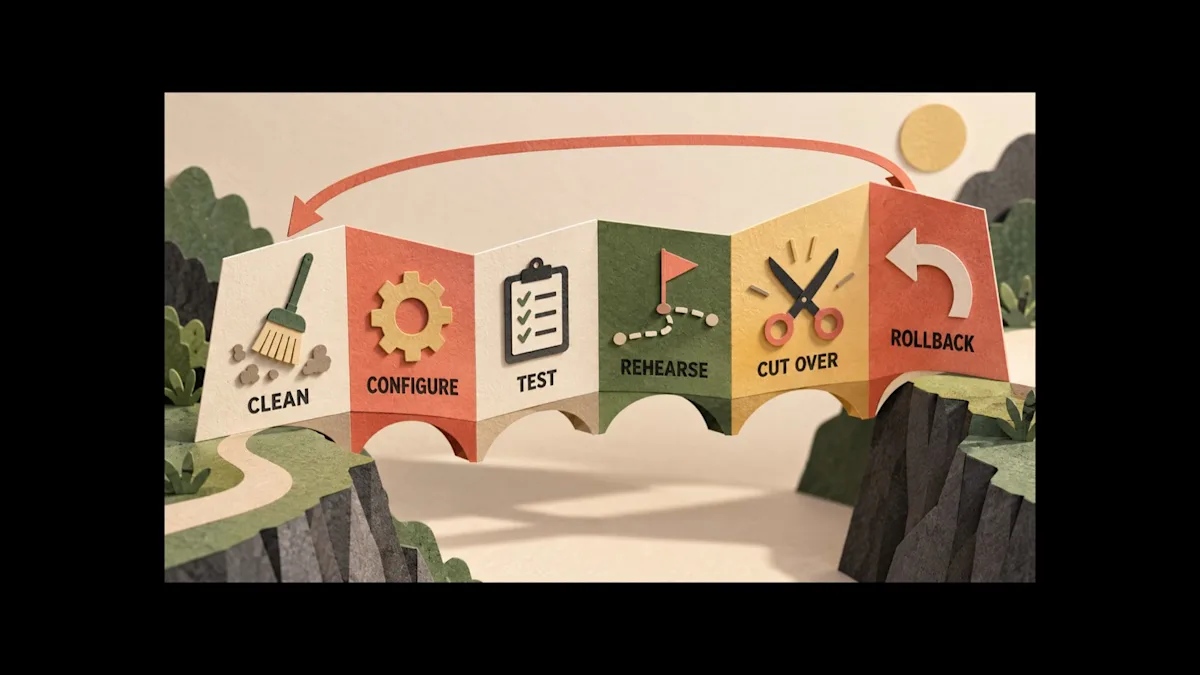
Move cleaned data through a testable migration path and keep a documented rollback option.
Do not move every workflow on the same day unless the risk has been explicitly accepted.
1. Clean
Remove obvious duplicates, stale test records, invalid contact data, and obsolete service definitions. Preserve required records under the center's retention policy.
2. Configure
Set services, locations, providers, availability, resources, prices, policies, packages, permissions, messages, integrations, and source labels in a controlled environment.
3. Test
Run the three demo journeys plus payment, message, export, and access tests. Use test data, not real client information, where possible.
4. Rehearse
Train each role on ordinary work and exceptions. Give staff a named escalation owner and a short cutover checklist.
5. Cut over
Choose a low-risk window, freeze conflicting changes, migrate approved data, reconcile counts, and monitor the first bookings and payments. Keep the old system available in the approved read-only or rollback state for the agreed period.
Document how to reverse the cutover if availability, payments, permissions, data, or communications fail.
Where Workee fits
Current Workee product pages describe online booking for services, packages, and memberships; provider availability; buffers; reminders; login-free booking; payments at booking; custom prices and deposit rules; payment links and invoices; client-management context; and workspace views of bookings, sales, and new clients. The pricing page positions Workee Business for multiple team members and locations, automated rebooking and follow-up, packages and memberships, and listed calendar connections.
Those capabilities make Workee relevant when a wellness center needs a business-growth and appointment workflow around its existing systems. A center can evaluate Workee for:
a branded client booking path;
appointment and provider scheduling;
approved reminders and follow-ups;
payment and deposit workflows;
client and booking context; and
business activity visibility.
Write down your room, equipment, class, clinical-record, insurance, inventory, payroll, integration, migration and compliance requirements, including how protected health information is handled. Confirm the plan, configuration, integrations, data flows, contracts, and capability boundaries during a demo.
Frequently asked questions
What software does a wellness center need?
At minimum, most appointment-based centers need an authoritative way to manage services, availability, bookings, client contact information, payments, communications, and operational reporting. Group, resource, membership, retail, clinical, payroll, inventory, or insurance workflows can add separate requirements.
Is wellness center software the same as medical practice software?
Not necessarily. Wellness software may focus on business operations, while medical practice systems may own clinical records, regulated documentation, prescribing, insurance, or other healthcare workflows. Define the center's legal and clinical role before selecting a system.
Does wellness software need to be HIPAA compliant?
That depends on whether the center is a covered entity or business associate and whether the software creates, receives, maintains, or transmits protected health information for a regulated function. Obtain a clinic-specific legal, privacy, security, and contracting review.
Should one system run everything?
Only if it can pass every material workflow and data-boundary requirement. A connected stack can be appropriate when each system has a clear owner and failures are monitored. The goal is not one login; it is reliable ownership and handoffs.
How should a wellness center compare vendors?
Use real services and three live demo journeys, score must-pass outcomes, verify the proposed plan and integrations, test exports and exceptions, calculate total cost, and document the migration and rollback path.
Choose the operating system, not the longest checklist
The right system is the one your team can operate on a busy day and explain during an audit. Map the center's operating model, protect the clinical boundary, test ordinary and failed journeys, reconcile the reports, and migrate in stages.
To evaluate Workee for a wellness center, bring one appointment, one package or membership, one payment exception, and one data-boundary requirement to the demo. Ask the team to prove the workflow in the proposed configuration and record every conditional dependency.



Keep updated about latest industry insights and subscribe to our newsletter
Follow Us


